Cracker 2.0 is a Blender add-on by vfxguide for adding cracks to a selected object. It works on one selected object at a time and edits real geometry, so save a copy before applying a destructive operation. The product listing announces Cracker 2.0 for Blender 4.5 and later, but its compatibility field lists Blender 4.5 through 5.2, leaving the upper end of the supported range unclear. The documentation describes its hotkey-based workflow.
Create cracks with Quick Mode
Select an object and press Ctrl + W to start Quick Mode. A heads-up display appears while you adjust the crack: G moves it and R rotates it. Press Enter to confirm or Esc to cancel. You can change the shortcut in Cracker’s preferences. Quick Mode is destructive, so work on a duplicate if you need to preserve the original mesh.
Use the circle interface for placement control
Circle UI Mode provides an on-screen interface and is described as non-destructive. The product guide recommends it for non-uniform or complex objects because it lets you place Cracker more deliberately. The product listing describes two ways to open Circle UI Mode: choose Add Cracker in the Cracker Panel, or start Quick Mode with Ctrl + W and press Shift + Enter. The separate documentation page says Cracker has no panel with buttons and lists Ctrl + W as its activation hotkey; it does not confirm that either Circle UI Mode route applies to Cracker 2.0.
Glass breaking and other damage tools
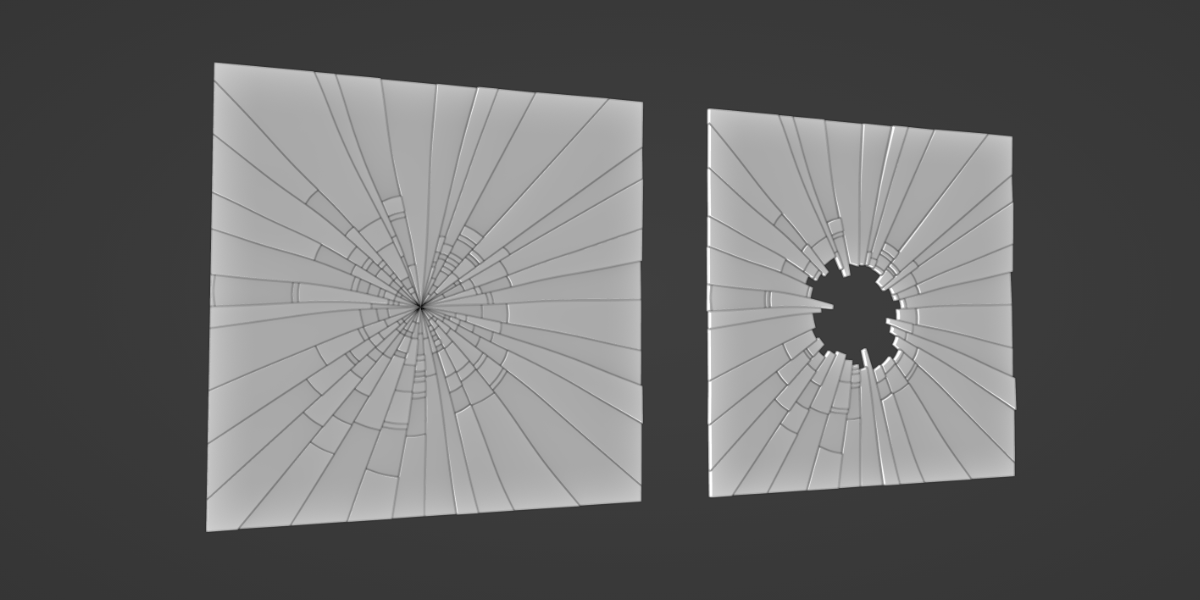
The product’s version history lists Stomper in version 1.3, the Glass Breaker in version 1.5, physics-based grounding in version 1.6, and new glass-breaking patterns in version 1.7. The listing separately describes Glass Breaker v1.2: open it with Alt + Y in Object Mode and choose Breaker. It expects a flat surface with thickness, a single-polygon front face, and applied scale; the listing says it cannot break round objects such as vases or cups.
Compatibility notes differ by tool: the listing marks Cracker 2.0 for Blender 4.5 and later, while its separate Glass Breaker v1.2 note says Blender 3.4 or higher. Check the current product instructions for the version you plan to install rather than applying the older tool’s requirement to the whole add-on.