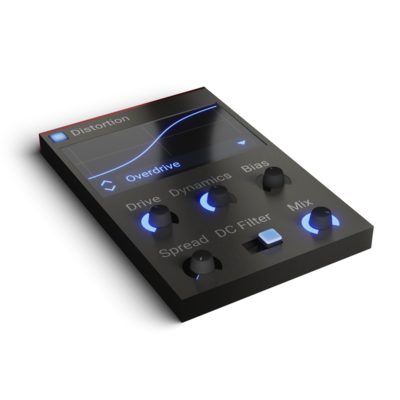
What Kilohearts Distortion does
Kilohearts Distortion is an audio effect for adding anything from a light edge to heavier distortion. Its Type control selects a distortion flavor. The Distortion product page lists overdrive, saturate, foldback, sine and hard clip; the Snapin manual also lists quantize.
Shape the effect
- Drive boosts the input before distortion. Higher settings produce heavier distortion.
- Bias adds a DC offset before distortion. Kilohearts says bias can help prevent a hollow sound.
- Spread applies different bias amounts to the left and right channels, which can add subtle stereo widening.
- Dynamics controls how much of the input's dynamic content is preserved.
- Mix sets the dry/wet balance, allowing some unmodified signal through.
These controls suit producers who want to try several distortion types and adjust intensity, dynamics, stereo spread and dry signal within one effect.
DAW and Snapin use
Distortion can run as a regular plug-in or as a Snapin in Kilohearts hosts such as Phase Plant, Multipass and Snap Heap. In a host, Snapins can be combined and modulated. Kilohearts lists VST, AAX and AU for regular plug-in use; its system requirements name DAWs that support VST2, VST3, AAX or Audio Unit.
Access and compatibility
Distortion is included in Kilohearts Essentials, a free collection available with an account. Snapin Hosts are sold separately. Kilohearts specifies a 64-bit x86 processor with SSE3, or Apple M architecture on macOS. It recommends keeping the operating system supported by its manufacturer and trying the free trials to check compatibility on an outdated OS. The requirements page lists no licensing hardware for Kilohearts plugin versions; versions installed through Slate Digital use iLok and require a valid Slate Digital license.