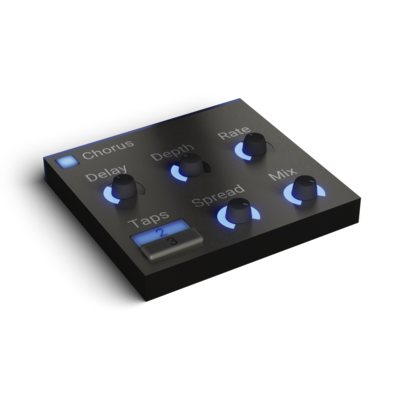
Kilohearts Chorus mixes a sound with delayed versions of itself to add stereo presence. You can use it as a regular DAW effect or as a Snapin in a Kilohearts host.
How the controls shape the sound
Set the average delay with Delay and choose the number of voices with Taps. Depth controls how much the delay varies, while Rate sets how quickly it varies. Spread adjusts stereo width; lower settings move the output toward mono. Mix balances the processed sound with the original signal, with lower settings letting more of the unmodified sound through.
DAW and Snapin Host workflows
Use Chorus directly in a DAW that supports a compatible plugin format. For a modular effect chain, load it as a Snapin in Phase Plant, Multipass, or Snap Heap. These hosts let you combine and modulate Snapins, as the Snapin documentation explains.
Access and system support
Kilohearts includes Chorus in its Essentials collection, which it lists as free with an account. The system requirements call for a DAW supporting VST2, VST3, AAX, or Audio Unit, and a 64-bit x86 processor with SSE3; macOS also supports Apple M processors. Kilohearts does not support OS versions once their manufacturers stop supporting them; for an outdated OS, it recommends trying its free trials to check compatibility before purchase.
The standard Kilohearts installation does not require licensing hardware. Versions installed through Slate Digital use iLok licensing and require a valid Slate Digital license, with an iLok USB dongle or iLok Cloud. Check the system requirements if you use that version or an older computer.