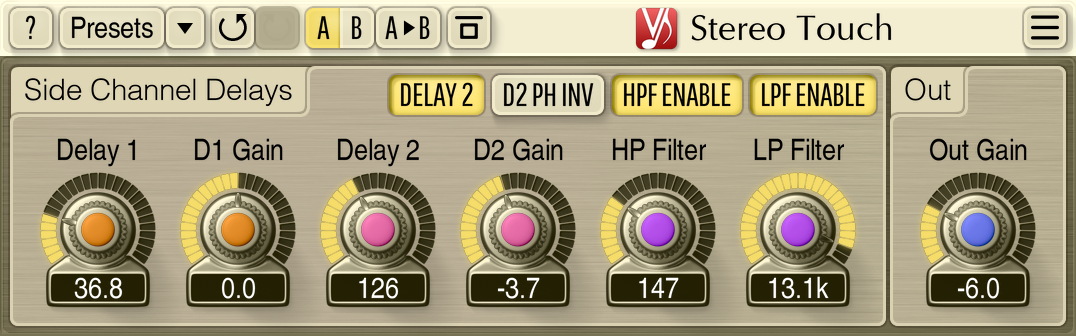
How it widens a mono track
Stereo Touch uses mid/side coding to turn a mono input into a stereo output. It creates side-channel information by delaying the input signal, then uses that signal as the side channel before mid/side decoding. Voxengo recommends it for mono sounds without overly sharp transients, including acoustic or overdriven electric guitars, synth pads, and vocals. It can add width without a double-tracked recording.
Control the side signal
Set the first delay time and level with Delay 1 and Delay 1 Gain. Enable Delay 2 to add a second delay line, then adjust its time and gain. When the delay times are close, the D2 phase-invert switch can reduce low-frequency buildup. The high-pass and low-pass filters can be enabled to filter the side signal, and Out Gain adjusts the master output level. Presets, undo and redo history, and A/B comparisons help you manage and compare settings. Voxengo also lists zero processing latency and 64-bit floating-point processing.
Compatibility and setup
Voxengo lists Stereo Touch as free and provides Mac AU, AAX, VST, and VST3 builds plus Windows VST, VST3, and AAX builds. You need an audio host that supports the matching format; listed examples include Ableton Live, Cubase, Logic Pro, REAPER, Pro Tools, and FL Studio. The compatibility information covers 32-bit and 64-bit Windows and macOS 10.12 or later, including Intel and Apple Silicon Macs. The stated hardware requirement is a 2.5 GHz dual-core processor and at least 4 GB of RAM.
On Windows, run the installer, select the plugin formats, and specify the VST folder if needed. On Mac, open the DMG and copy the plugin file into its matching system folder. Rescan plugins or restart the host afterward. Voxengo says registration and an internet connection are not required for the plugin to function. Its Conditions of Use say software use follows any EULA that accompanies it, so check that agreement for applicable use rights; the free listing alone does not establish commercial-use terms.