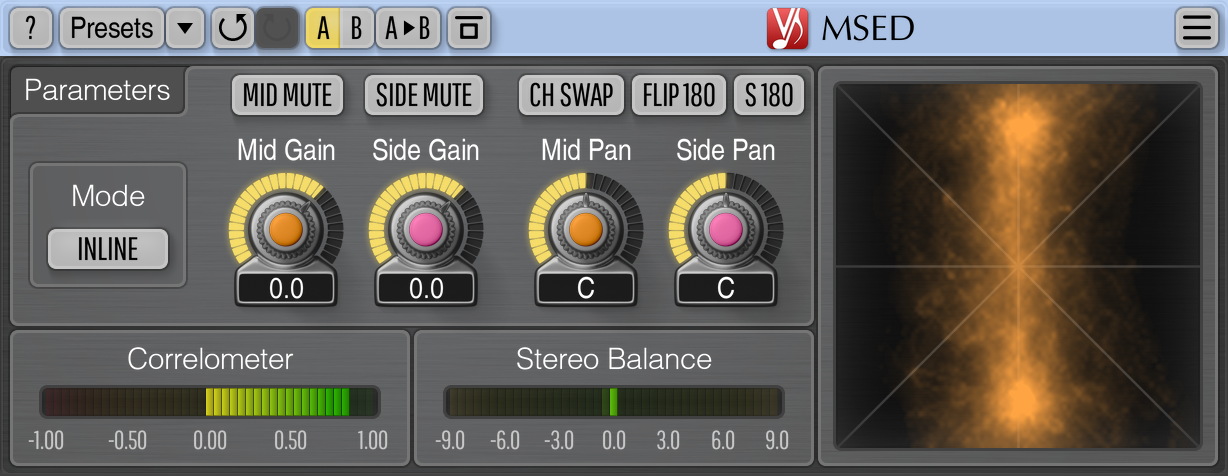
Voxengo lists MSED as a free plugin for converting stereo left/right audio to Mid/Side and back. It fits mixing sessions that need direct control over the center and Side components, plus a way to inspect stereo correlation, balance and phase behavior.
Choose an encode, decode or inline workflow
Encode converts left/right input into Mid/Side; Decode turns a Mid/Side signal back into left/right. Inline mode performs encoding, Mid/Side adjustments and decoding in sequence, so you can make basic changes in one plugin instance. Set Mid and Side gain, pan and mute independently. Changing the Side level relative to Mid can adjust stereo width. A right-button drag on either gain control links the two levels inversely.
Inspect the stereo signal
MSED has stereo correlation and balance meters. The correlation meter shows a 500-millisecond average, with negative values indicating anti-phase content and positive values indicating in-phase stereo information. The balance meter reports the left/right level difference in decibels; it applies to stereo signals, and a negative reading means the left channel is louder.
The Plasma Vector Scope displays the output signal with different frequencies at different radii. The manual says centered signals draw a vertical line, panned signals draw diagonal lines, out-of-phase signals draw horizontal lines, and uncorrelated signals draw circles. Low frequencies sit toward the outside of the display, while higher frequencies move toward the center. It uses no CPU resources while the plugin interface is closed.
Controls and compatibility
Separate controls swap the input channels or flip phase. MSED also includes preset management, undo and redo, and A/B comparisons. Its documented controls focus on Mid/Side routing, level, panning, phase and stereo monitoring; the feature list does not include EQ or dynamics processing.
Voxengo lists AU, AAX and VST3 downloads for Mac, and VST, VST3 and AAX for Windows. The plugin needs a host application that supports the installed format. Voxengo lists 64-bit Mac OS 10.12 and later for Intel and Apple Silicon, unless a version is announced as unsupported; its Windows installer supports 32-bit and 64-bit host applications. Published minimum hardware requirements are a 2.5 GHz dual-core processor and 4 GB of RAM. Check the MSED compatibility details and installation instructions for your host. The MSED user guide explains the modes and parameters in detail.