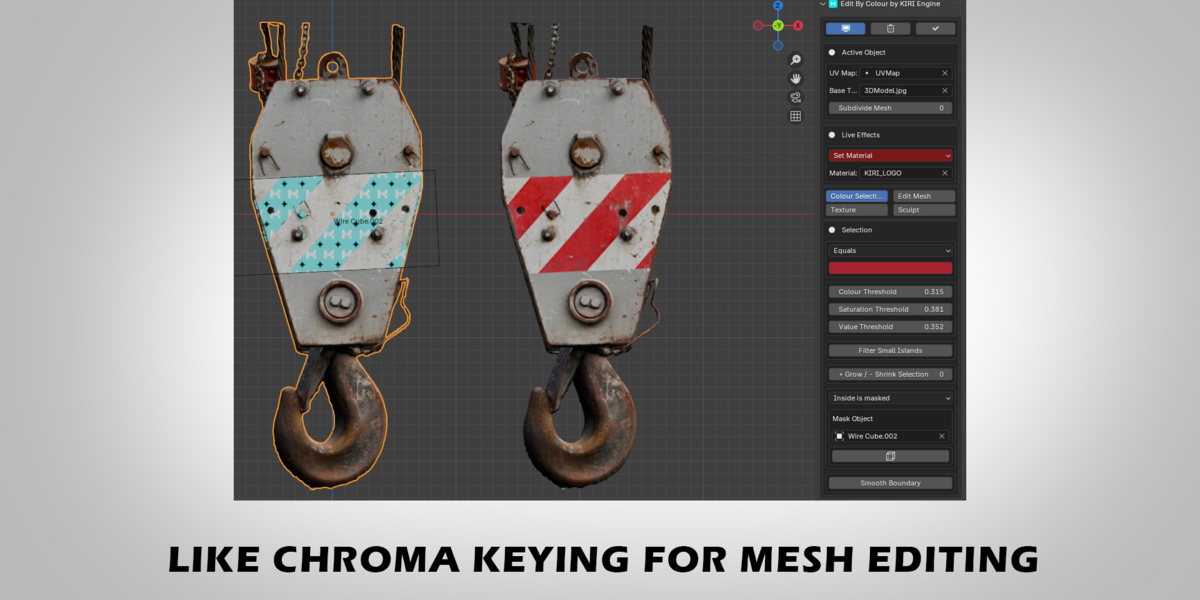
Edit By Colour by KIRI Engine is a Blender add-on for selecting mesh regions from an object's existing diffuse texture. It is designed to make selection editing on high-poly or non-quad meshes more manageable. Pick a color, refine the selection with threshold values, then smooth it, grow or shrink it, or mask it by objects.
Use color selections for mesh and sculpting tasks
A selected region can be duplicated, split, or deleted from the mesh. You can also convert the selection into face sets for sculpting or shader attributes for material masking. Since the workflow starts with an existing diffuse texture, it is most directly suited to meshes where color helps identify the region you want to edit.
Patch-based texture editing
The add-on includes a workflow for baking a small portion of a mesh into a texture patch. That patch can replace selected parts of the model, after which the result can be baked again with the original textures to form one unified texture.
Retopology support
Edit By Colour can generate automatic quad loops around a color selection. The product listing describes merging and connecting those loops as a way to speed up manual retopology.
Compatibility and documentation
The Superhive listing identifies Blender 4.3 and 4.2, marks the add-on as Blender Extension compatible, and lists its license as GPL. Check the listing for current compatibility details if you use another Blender version. Written documentation is linked from the KIRI 3D Tools page, which also points to the creator's YouTube channel for tutorials.