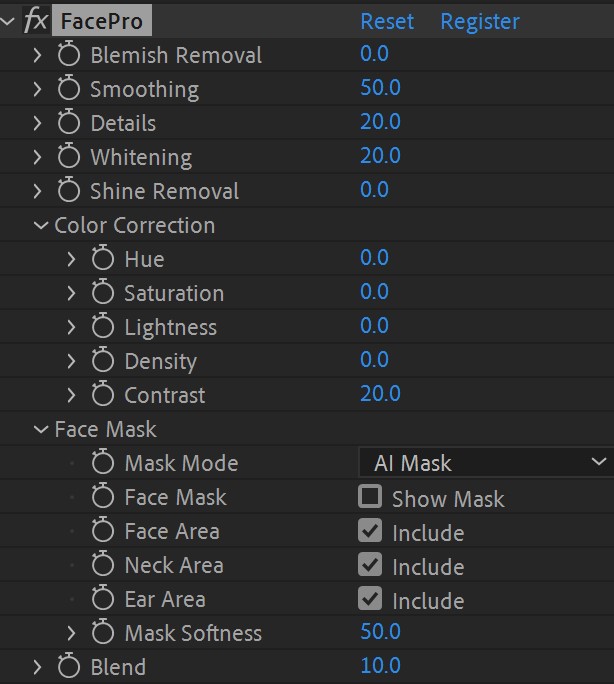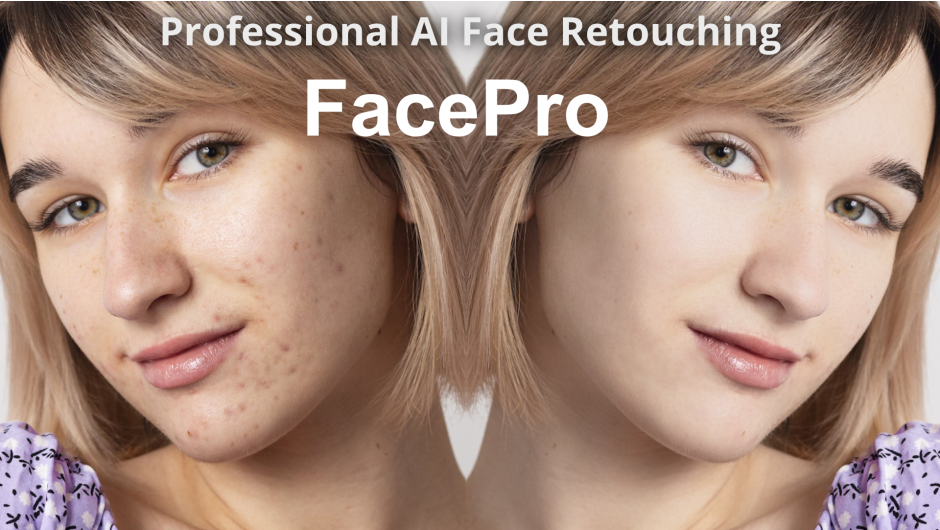
FacePro is a GPU-accelerated portrait retouching plugin for Adobe After Effects and Premiere Pro. With AI Mask selected, FacePro detects faces and creates a skin mask that separates skin from hair, eyes, eyebrows, lips and the background. It can handle multiple faces, and you can inspect and refine the mask before finishing the retouch.
Masking and retouch controls
FacePro provides AI Mask, Skin Color, External and None mask modes. Use the AI mask for automatic face analysis, Skin Color for an alternative color-based mask, or External when you have a mask prepared elsewhere. Retouch adjustments operate on the masked area; when no face mask is detected, Blemish Removal can apply to the whole image.
Blemish Removal targets spots, acne, pimples and minor scars with a single slider. The smoothing controls reduce uneven skin texture while preserving fine detail. Whitening adjusts facial skin tone, while Shine Removal uses localized exposure and texture correction to reduce specular highlights. Color Correction provides controls for hue, saturation, lightness, density and contrast; extreme settings can create stylized color effects.
Typical workflow
Apply FacePro to a shot, then use Blemish Removal if needed. Adjust smoothing and detail, followed by whitening, shine removal or color correction as needed. Review the mask and refine it so the skin-focused adjustments cover the intended areas.
Compatibility and licensing
FacePro is available for Mac and Windows. The product listing names After Effects and Premiere Pro versions 2020 to 2027 as compatible. Its GPU acceleration is documented, but the listing does not specify minimum GPU or hardware requirements.
The posted EULA permits one installed copy on one computer at a time and one archival copy stored on media other than a hard drive and used only for reinstallation. Multiple users or copies require an appropriate license for each.