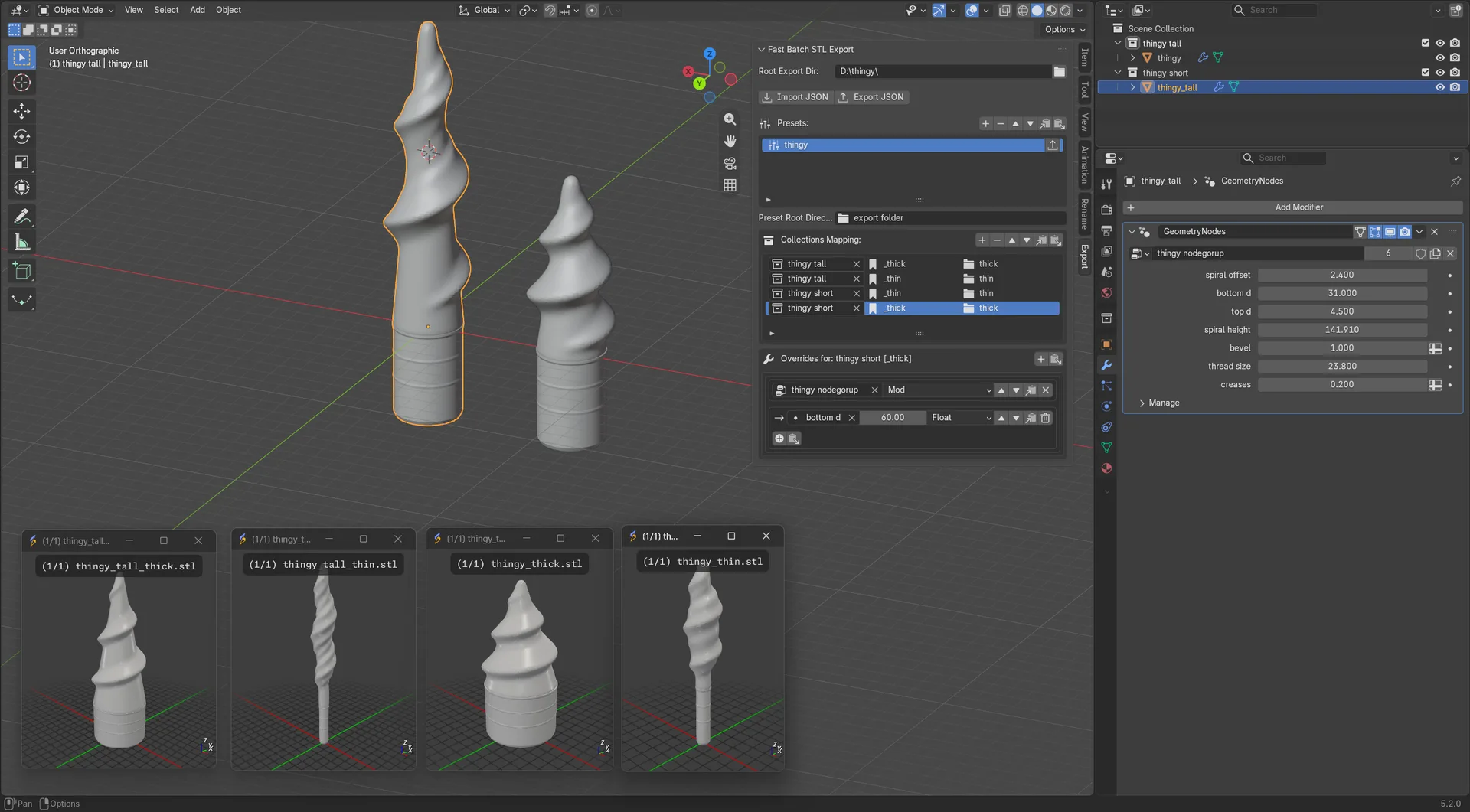
Batch STL Export with geometry nodes overrides maps Blender collections to folders and exports their objects as STL files. Each preset lets you map collections to destination subfolders and set collection-specific Geometry Nodes inputs for export. That can keep compute-heavy settings, such as subdivision levels or voxel resolution, high for the exported mesh while leaving a lower-resolution setup in the viewport. The Blender Extensions listing identifies version 7.0.0 and marks the add-on discontinued. Version 7.0.0 supports Blender 5.2 and newer. It links Combi Export as a successor in Blender's approval queue.
Collection presets and output folders
A preset groups collection mappings with their target folders. You can set a main root directory and give each preset its own root. The extension creates directories when they do not exist. If a preset or collection folder field is empty, no folder is created for that entry.
Each collection mapping can also have a tag. When its tag button is enabled, the tag is appended to the exported objects' filenames. When disabled, the tag can still serve as a custom name for the mapping.
Geometry Nodes overrides
Overrides let you set Geometry Nodes inputs for export without changing them manually each time. Supported input types include floats, integers, booleans, menus, and strings.
Overrides can belong to one collection or be pinned across all collections in a preset. Unpinning localizes an override to each collection, while deleting a pinned override removes it from all collections. To target an input on a node, specify its parent node group and child node name. For an input exposed in the modifier panel, specify the node group, then provide the input name, type, and value.
Changes in version 7.0.0
Release notes dated September 20, 2026, add pinned overrides and optional filename tag appending. They also describe isolating the currently processed batch by disabling other objects' modifiers during export, and grouping collections that share overrides to reduce unnecessary dependency graph evaluations. A console can show export progress and timings for each collection. The listing gives no comparative benchmark results.
Compatibility and cautions
The listing specifies Blender 5.2 and newer, no special permissions, and a GPL-3.0-or-later license. For installation from disk, see the Blender Extensions manual.
The developer describes the add-on as created with Gemini Pro, recommends backing up files before use, and says they cannot guarantee it will run without hiccups. Since the listing marks the extension discontinued, check its current status before choosing it for a new workflow.