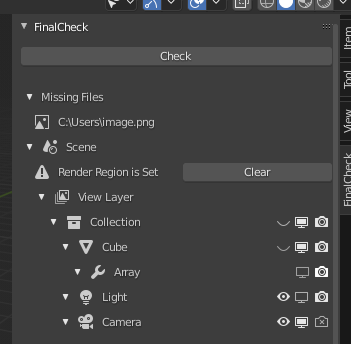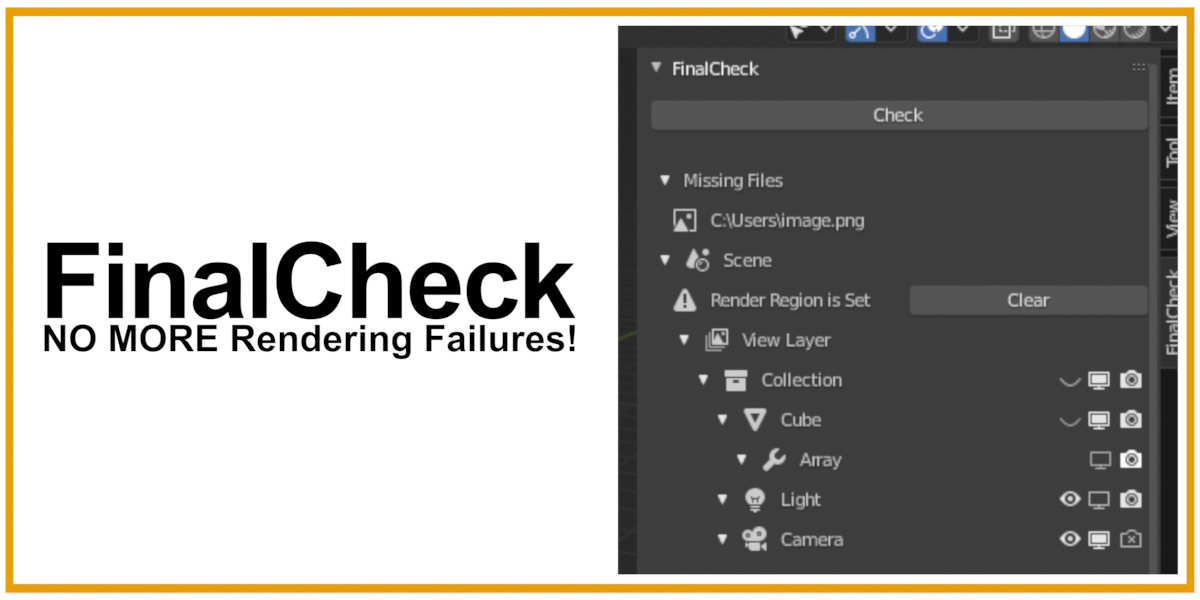
FinalCheck is a Blender add-on by Omine that checks a project for problems that could affect a render. Open the Sidebar in the 3D Viewport, choose the FinalCheck panel, and press Check to see flagged items. You can also enable automatic checks when rendering.
What FinalCheck checks
FinalCheck compares viewport and render visibility for collections, objects, instancers, and modifiers. It also checks image paths, whether a render region is unset, whether Resolution% is at least 100%, and whether render samples are at least as high as preview samples.
- Particle checks compare emitter visibility and child amounts between the viewport and render, and check whether the particle viewport display amount is 100%.
- Grease Pencil checks compare modifier and effect visibility between the viewport and render.
- The Composite check compares the inputs of the Viewer and Composite nodes. The developer labels it an alpha feature and says it is incomplete because of Blender Python API limitations.
These checks help catch configuration differences and missing files before a render. See the FinalCheck product page for the full list.
Choose what to scan
In the Preferences sub-panel, you can turn individual checks on or off. Blender saves those preferences automatically. You can run checks across all scenes or limit them to the current scene and view layer. Complex projects may take longer to scan; reducing the selected checks can help. Image paths on network locations can also add time.
Compatibility and limits
The developer lists Blender 2.90 or later and says FinalCheck was tested up to Blender 4.5.3 as of October 2025. The marketplace lists Cycles and Eevee in its “Render Engine Used” field. Check the developer’s listing for newer compatibility information.
FinalCheck does not detect every possible problem. Its checks use the current frame and do not account for the state of other frames, so an animation may still have issues that a single-frame check will not find. The add-on is distributed under the MIT license, and the developer lists English and Japanese language support.
Sources
- FinalCheck product details and usage
- Developer FAQ
- Developer documentation