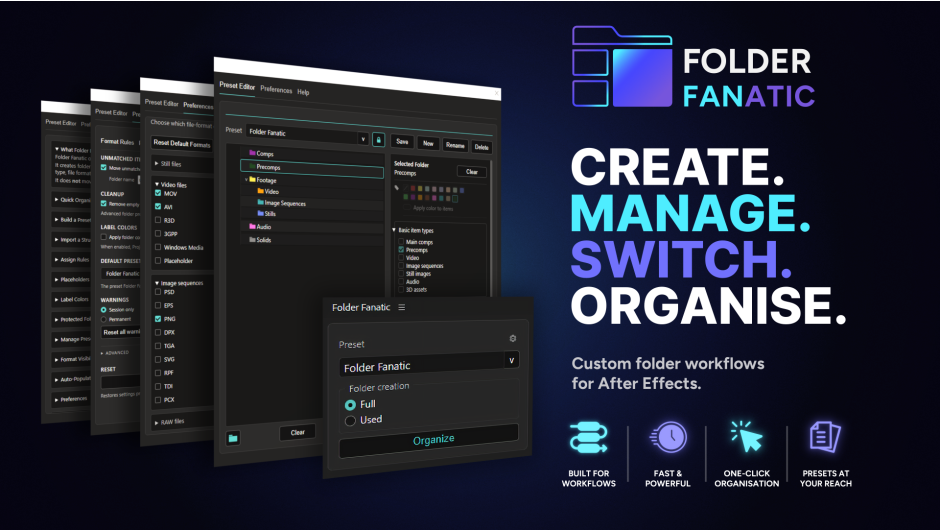
Folder Fanatic is an After Effects panel for building, saving, and reusing project folder structures. It also organizes project items with one-click sorting rules. It suits users who reuse a standard folder layout or need distinct structures for different projects. Example presets include Working Project, with Comps, Footage, Stills, Audio and 3D folders; Studio A, with 01_Production, 02_Media, 03_GFX, 04_Audio and 06_Exports; and Hand Over, with Completed Scenes, Shared Assets, WIP_Scenes and Render Comp.
Build and reuse folder structures
Start with a blank structure, import folders from the current project, or clone and adapt an existing preset. Arrange the hierarchy, assign rule sets, and save it for later projects. The preset manager supports creating, renaming, and deleting presets. Its workflow also covers full versus used structures and the handling of Unsorted and Solids folders.
Sort assets with Smart Rules
Rules can match filenames, file formats, and media properties such as resolution, frame rate, aspect ratio, and duration. Stack rules to make sorting more specific. The project scanner detects file types so you can assign their rules directly. You can also create a new preset from project assets, with category folders, format subfolders, and per-category options. This creates a new preset without overwriting existing ones.
When multiple folders match an item, more specific matching folders take precedence over broader fallbacks. Folder order breaks ties between equally specific matches. An overlap warning calls attention to folders that may be skipped.
Use color to track organization
Set colors for individual folders. Preferences let you apply colors to sorted project items and, optionally, their timeline layers, so the same color cues can appear in both the Project panel and timeline.
Compatibility and license terms
The product listing marks Folder Fanatic as compatible with After Effects 2024, 2025, 2026, and 2027, and links to a free trial.
The posted EULA grants one copy for use and allows one archival copy on a storage medium other than a hard drive, for reinstallation only. It restricts installation or use on multiple computers, shared systems, and use by multiple users unless an appropriate license is obtained for each copy and user. Check the license terms against your intended setup before using it across a team.