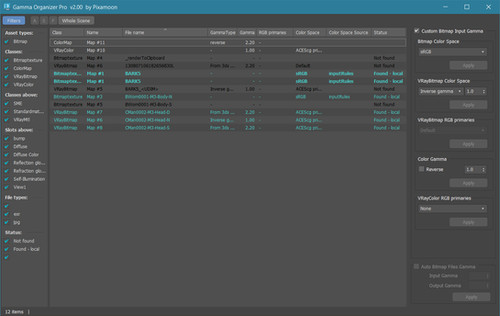
Gamma Organizer is a 3ds Max script from pixamoon for managing bitmap gamma and color-space settings. It can change bitmap load gamma across a scene or selected bitmaps, provides separate Gamma and Color Space settings for several map types, and can change global input and output gamma values.
Separate settings for different map types
The tool groups its Gamma and Color Space settings into three areas: BitmapTextures, Corona, FStorm, RedShift and Octane; VRayHDRI and VRayBitmap; and Arnold Image. Keeping these controls separate lets you choose the setting for the map type you are working with.
Filter maps by selection or type
You can filter by selected objects, selected material or bitmap type. The available type filters are All, Normal Bump, VRay Normal Bump and Corona Normal Bump. These options help narrow a change to the relevant part of a scene.
Normal Bump settings for V-Ray and Corona
Pixamoon describes Gamma Organizer as a way to switch gamma in Normal Bump when merged models arrive with automatic gamma in the Normal Map, a situation that can cause a V-Ray render crash. The developer recommends Override 1.0 for V-Ray Normal Bump and V-Ray Normal Map, and Automatic for Corona Normal Bump. For additional context on normal maps, see Corona's normal-map guide.
Pro listener and 3ds Max compatibility
The Pro version includes a Bitmaps Listener that shows bitmaps, their slots and classes, and where they are located. It can also show maps by selected objects. Pixamoon states that changing bitmap input gamma works in 3ds Max 2014 and later.
Editions and licensing
The available listings describe different offers: AnyPlugins calls the download free and mentions a Lite edition, while Pixamoon's Pro product page lists commercial and personal licenses and displays a $12.00 price. Pixamoon says each license can be activated on one PC. Check the developer page for the current edition, price and license terms.