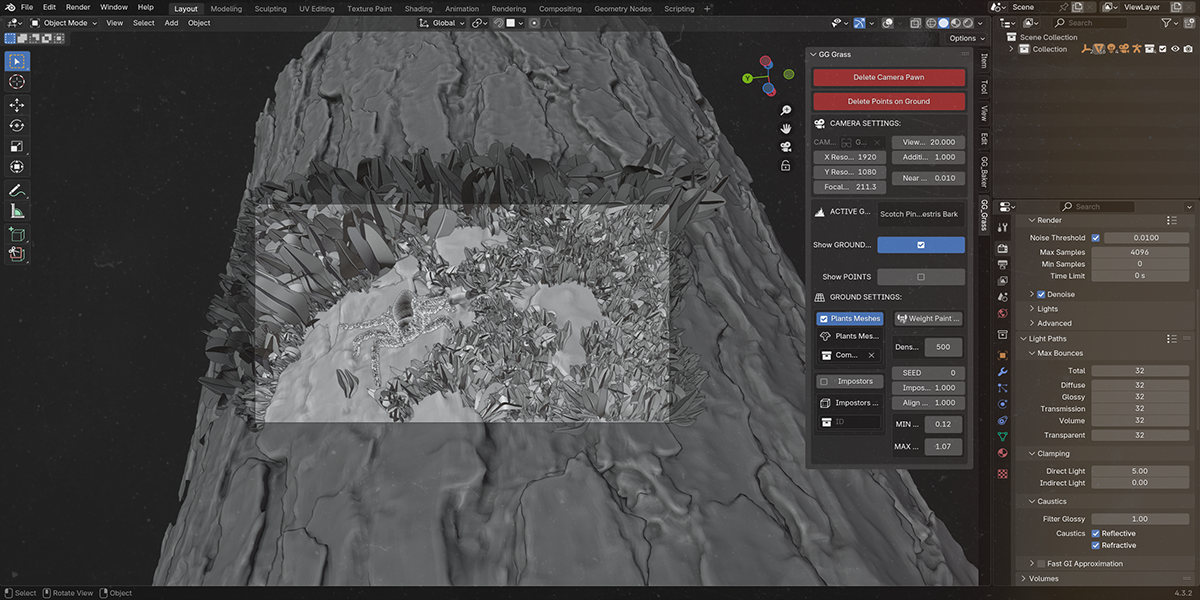
GG Addon is a Blender add-on by Impedelse for creating grass and tree systems on a landscape or another mesh. Its workflow combines camera culling with impostors to reduce render work and scene geometry.
Build a vegetation system
The product listing says camera culling is enabled by default and describes it as a way to reduce render time and improve overall performance. Pairing culling with impostors can reduce the amount of geometry used to represent vegetation. The listing does not provide benchmark results, so the performance change will depend on the scene.
The setup starts with a Camera Pawn and a ground mesh. Add points to the ground, put the plant meshes in a collection, then enable PLANTS MESHES and select that collection.
Bake an impostor with GG_Baker
GG_Baker is available in Blender’s N-Panel. The listing’s workflow uses a new Blender window and a 2-sided or 4-sided template:
- Open a new Blender window, then open the GG_Baker tab in the N-Panel.
- Create a 2-sided or 4-sided template. Add a collection with the plus button, put the mesh in it, and reset the mesh location with Alt+G.
- Adjust the baker scale. Select the mesh or meshes, then use SELECT BAKER for the selected-to-active bake.
- Choose a texture size and bake. Review the result in the 3D Viewport’s Preview Mode.
- Set a TextureSet Name or keep the default, then choose where to save the textures.
- Choose MAKE IT EXPORT-READY, copy the impostor, and paste it into the main scene’s Impostor Collection. Enable IMPOSTORS and select that collection.
Compatibility, license and documentation
The Superhive product listing identifies GG Addon as a GPL add-on, marks it as Blender Extension compatible, and lists Blender 4.3 to 4.5. The supplied listing does not state compatibility outside that range. It includes a Documentation tab. AnyPlugins lists the add-on as free; check the seller listing for current availability and license terms before downloading.