Haggis Tools is a Blender add-on by Online Render that groups object, selection, animation and interface utilities in quick menus and toolbar controls. The product description says it is for Blender 2.8 and later, but the explicit compatibility list names releases only through 3.0. The marketplace lists version 1.1.5.
Object and scene work
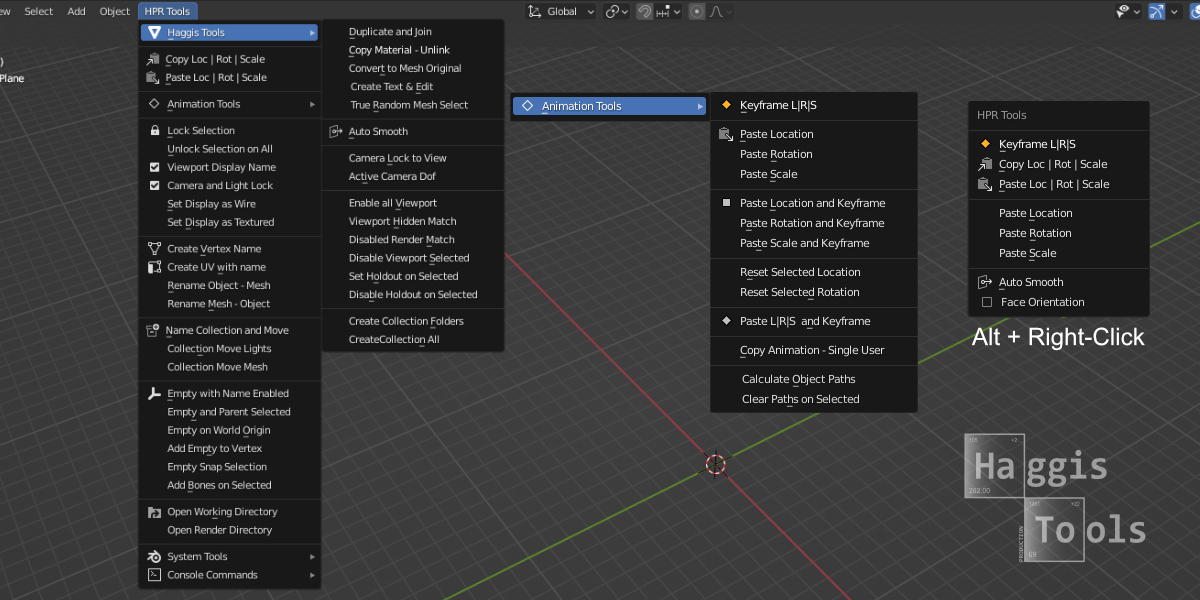
Haggis Tools includes commands for copying and pasting location, rotation and scale, and for storing and recalling those transforms. It can duplicate objects and join them, rename an object and its mesh, move objects into collections, and create empties on selected objects or vertices. The feature list also includes adding bones to selected objects.
These commands cover repeated scene-management steps within Blender. For example, an artist can copy transforms between objects, organize mesh objects into a collection, or place an empty at selected vertices for instancing.
Selection and mesh tools
The selection tools include selecting objects by polycount, selecting objects with a scale greater than one, and finding objects disabled in the render engine. Users can lock an inverted selection. In Edit Mode, version 1.1.5 adds a command to duplicate and separate selected topology. Its release notes also list material assignment options and creating a material with the active object's name.
Earlier release notes describe applying transformations, flipping normals, and selecting objects with negative scale or negative axis locations. The exact tools available are tied to the add-on version; consult the product listing for the version details.
Animation and viewport controls
Press Alt + Right Click to open the animation tools quick menu. The listed commands include keyframing location, rotation and scale; copying and pasting transforms, including individual channels; skipping keyframes in user-set increments; and calculating or clearing object motion paths.
Icons in the top-right area of Blender provide controls for QuadView, selected-object name display, transform gizmos and camera-view locking. The toolbar can be customized, and a user-specified editor can open in a floating window, which the product page describes as useful for dual-screen setups.
Version and documentation
The explicit compatibility list names Blender 2.8, 2.81, 2.82, 2.83, 2.9, 2.91, 2.92, 2.93 and 3.0. That list does not confirm compatibility with later releases, so check the current listing before installing on a newer Blender version. The listing identifies the license as GPL.
The seller provides a documentation page and a video tutorial for version 1.1.5. Its FAQ includes answers about commercial use and feature requests, and records the developer's intention to implement Geometry Nodes without naming a release that includes the feature.