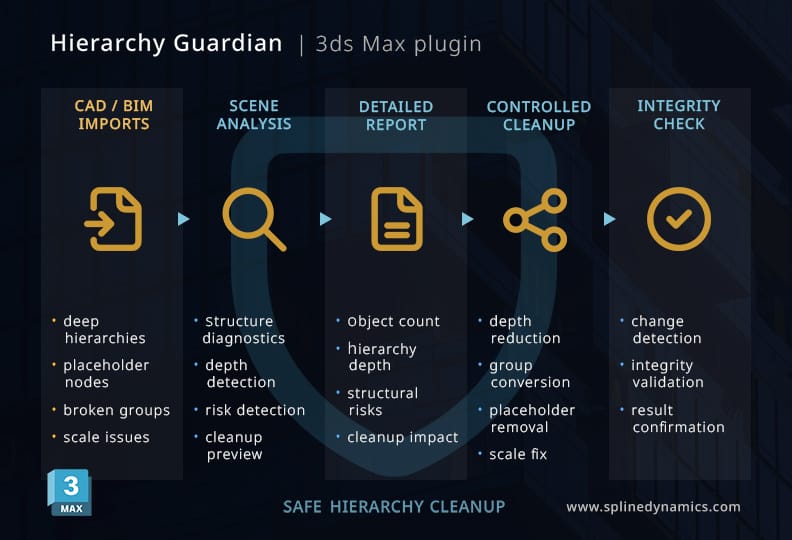
Hierarchy Guardian is a 3ds Max plugin for analyzing and cleaning complex scene hierarchies, especially in scenes imported from CAD, BIM, Revit, or SketchUp. It lets you inspect proposed changes before cleanup, then validate the result and restore a previous state if needed.
Preview hierarchy changes first
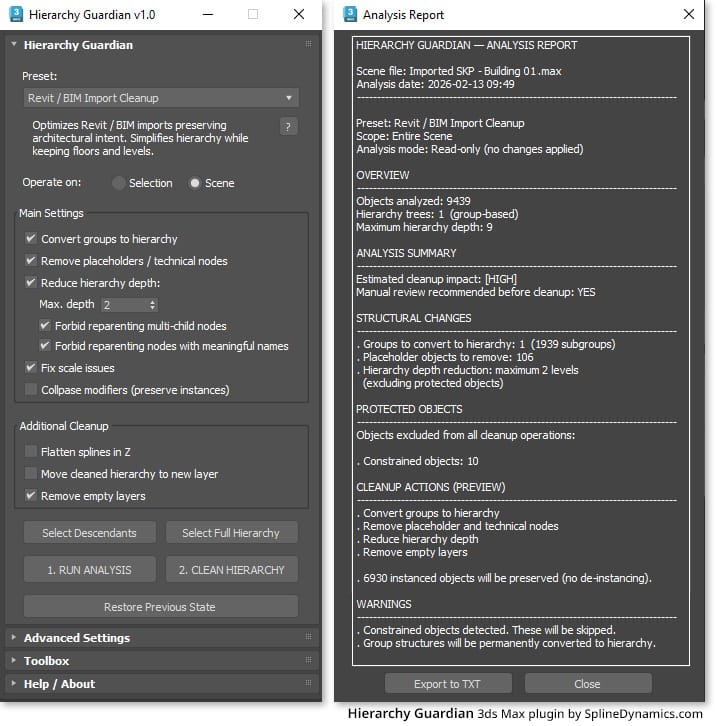
Run Analysis to scan the scene in read-only mode. Its report includes object and hierarchy counts, maximum depth, planned changes, protected objects, risks, and an estimated impact of Low, Medium, or High. Adjust the settings and analyze again if the report does not match what you expect. Clean Hierarchy follows the most recent valid analysis, so rerun it after changing settings.
You can choose a selection or the entire scene as the cleanup scope. Testing on a selection first is useful when you are checking settings on an unfamiliar import.
Choose a cleanup approach
Presets provide starting configurations for common imports and scene types. The manual describes options for aggressive CAD cleanup, Revit or BIM imports, conservative ArchViz cleanup, and asset library normalization. Ultra Flatten is an expert option that can significantly alter scene structure, so review its analysis report carefully before applying it.
Depending on the settings, cleanup can reduce hierarchy depth, convert groups into parent-child hierarchies, remove technical placeholders, and detect or fix inherited scale issues. Additional controls can collapse modifier stacks while preserving instance relationships. The report previews these actions before they run.
Protect scene elements and validate the result
Protection settings can exclude cameras, lights, proxies, XRefs, hidden or frozen objects, and animated, constrained, or instanced-controller objects. The report identifies protected objects, and the manual states that excluded objects are not modified. Object instancing is preserved during cleanup.
Hierarchy Guardian creates a 3ds Max Hold snapshot before cleanup by default. Full-scene backups are optional, with settings to create one per scene or when a cleanup is rated high impact. After cleanup, validation checks for unexpected structural changes. Restore Previous State can return to the last Hold snapshot or recover from a safety backup.
Use the toolbox for targeted operations
The Toolbox contains selection-based actions that do not require a full analysis, including converting groups, collapsing modifiers, removing placeholders, resetting scale, flattening splines, sanitizing object names, and deleting empty layers. Since these actions operate directly on the selection, use them for focused changes and review the result afterward.
Compatibility, installation, and trial
The manual lists 3ds Max 2019 and later as required and says the plugin was tested with versions 2019 through 2026. To install it, unzip the download and drag the .mzp file into a 3ds Max viewport, then choose the 10-day trial or activate with a license key when prompted. The official product page lists a fully functional 10-day trial and purchase options. See the Hierarchy Guardian manual for workflow and license details.