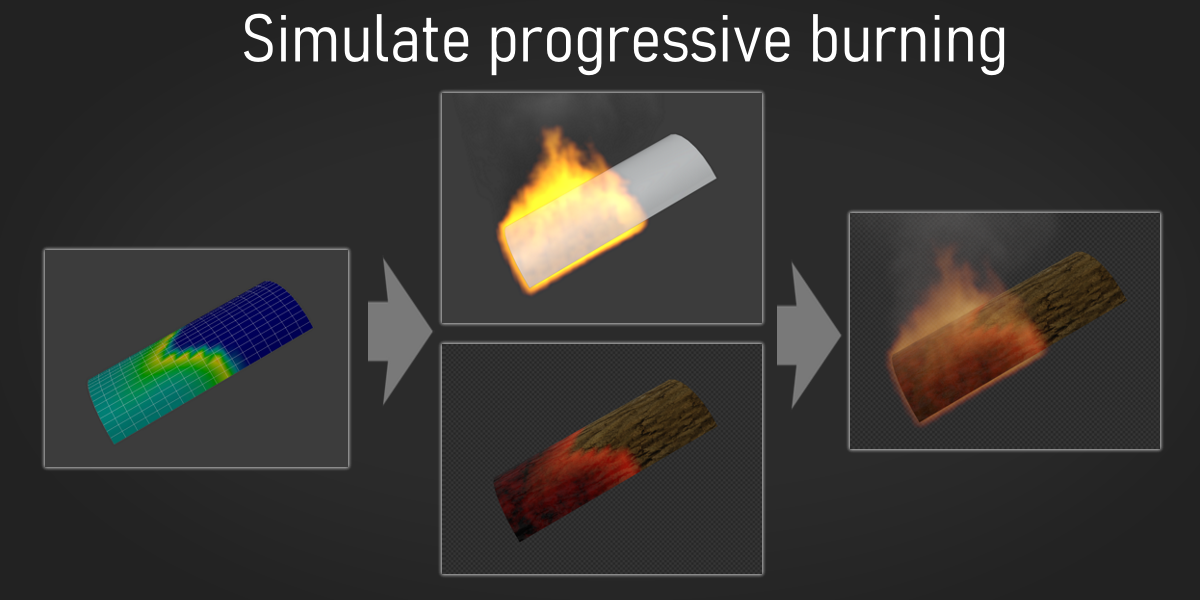
Ignite - Fire Dynamics is a Blender add-on for animating a burn as it spreads across an object. Its simulation tracks combustion, heat diffusion, fuel consumption, and char formation, then supplies animated data for surface materials and flame effects. It suits shots where an object catches fire and changes as it burns.
Simulate combustion across an object
Ignite models the burning process on a surface. Heat spreads, fuel is consumed, and char forms as the fire moves. Its parameters can produce quick, fuse-like burning or slower wood fires, where an insulating char layer slows the reaction.
An optional heat volume lets heat transfer through a 3D air-temperature grid between vertices that are not connected on the mesh. The developer notes that this setting can affect performance, so it is useful when that kind of heat transfer matters to the shot.
Set an ignition point and bake
Enabling Ignite for the object prepares four vertex groups for simulation data. Paint the ignite_input group to set initial temperatures, choose the frame range and simulation settings, then bake. The animated heat, fuel, and fire groups can be inspected in Weight Paint mode or used by materials.
Add flames and smoke
Ignite can drive Blender's built-in flame and smoke functions. One documented setup is to add Quick Smoke to the burning object, choose Fire + Smoke, select ignite_fire as the vertex group, and use the same frame range as the Ignite bake. Run or bake the fluid simulation through its domain. The developer also names Blaze, Wisp, and Khaos as compatible add-ons.
Make materials change as the object burns
The animated Ignite shader attribute stores temperature, unburnt fuel, and fire intensity in its X, Y, and Z components. You can build a custom shader from that data or use the included node group, which blends three supplied materials across burning stages and adds emission where flame intensity is highest. Material presets provide a starting point.
Tune the simulation
Settings control timestep size, simulation steps per frame, heat diffusion, cooling, ignition threshold, fuel consumption, and char insulation. The documentation warns that large timesteps can behave unpredictably and recommends combining them with multiple steps per frame. Increasing heat-volume resolution adds no detail when the grid cells are already denser than the mesh vertices.
See the developer documentation for installation and setup details, and the developer FAQ for compatibility notes.