Image Modeler Tools is a Blender add-on by Vovrzull for working with cameras and locators created in Autodesk ImageModeler. It loads cameras and empties from an FBX file, configures the cameras, connects images, and prepares the scene for modeling.
Bring an ImageModeler camera setup into Blender
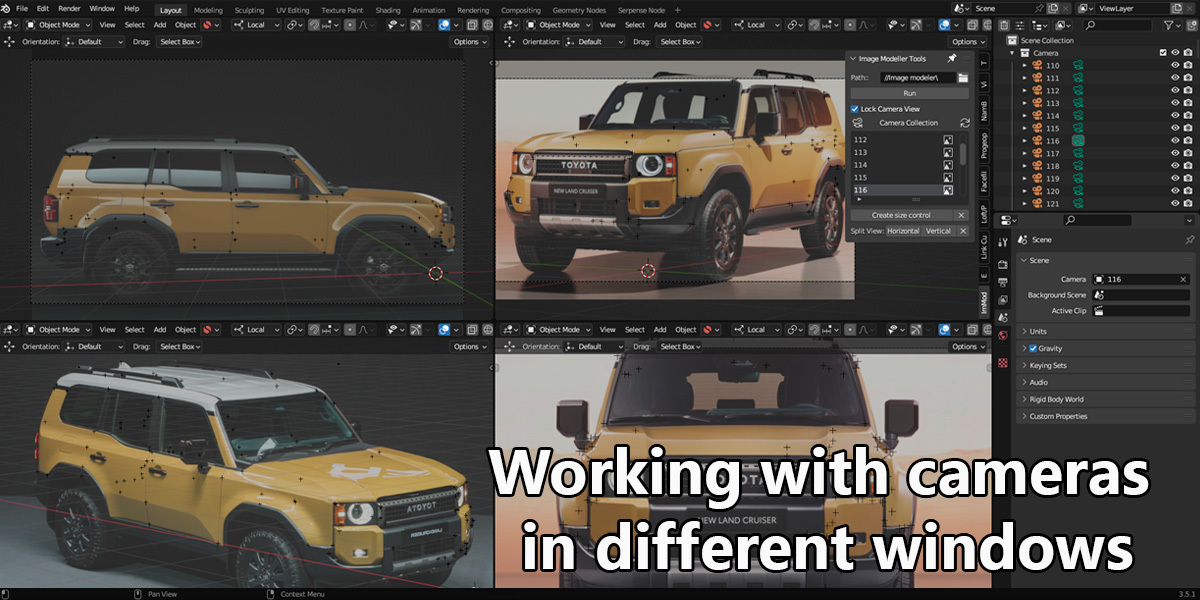
The add-on handles the initial scene setup in one button press. After import, you can switch between cameras quickly or keep different cameras fixed in separate windows to compare views from several angles while modeling.
It can also show the real size of the model transferred into Blender, which you can then correct. This makes the add-on relevant to projects that already use Autodesk ImageModeler camera and locator data in an FBX workflow.
Compatibility and documentation
Superhive lists the add-on as GPL-licensed and compatible with Blender 3.4 through 5.3. The AnyPlugins listing reports Blender 3.4 through 5.1, with its facts verified in July 2026. Check the current Superhive listing if compatibility with a particular Blender release matters.
The documentation covers creating vertices from an empty. For import issues, the product FAQ advises setting orientation before exporting to FBX if camera size or rotation is wrong.