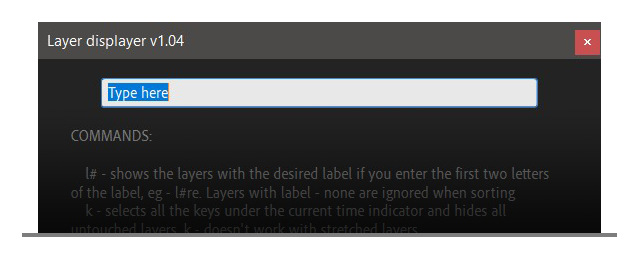
Layer Displayer narrows a busy After Effects timeline by analyzing layers and using their Shy property to hide layers that do not match the requested view. It suits projects where you need to focus layers by timing, keyframes, labels, selection, parent relationships, or custom groups. Its pa command shows layers shared with the parent layer of a selected layer.
Filter layers by time and keyframes
Use t to reveal layers under the current time indicator, or wa to reveal layers within the work area. The k command selects keyframes under the current time indicator and hides untouched layers; ks applies that workflow within the work area. For selected layers, kfs selects keys under the time slider and ksfs selects keys in the work area.
Keyframe selection can have problems with layers stretched in time. The product instructions suggest locking stretched layers to exclude them from selection. The listing says layers with the gray label are hidden automatically.
Filter by selection, labels, and groups
Use s to show only selected layers. A label command such as l#re reveals layers with the red label; the first two letters are enough, and layers with no label are ignored. A second label mode shows layers that share a label with the selected layers.
Custom groups let you name sets of selected layers without relying on labels. A layer can belong to several groups, and the Groups category provides buttons to show layers by group name. Commands include msk to hide masks, n to hide nulls, lo to hide locked layers, en to hide enabled layers, and le to hide locked and enabled layers. gl reveals guide layers and is toggles the Shy setting across all layers.
Controls, compatibility, and license
The script has a command field, buttons, and Windows shortcuts. Its “All checking” setting limits the panel to buttons that apply to the active composition; the listing says this mode can slow execution slightly. A free trial is listed.
The product page lists After Effects 2020, CC 2019, and CC 2018 as compatible. Its description says the script was run on versions from 2014 to 2018 and recommends After Effects 2018 or newer for convenient script hotkey assignment. The EULA allows one copy on one computer at a time; multiple copies or users require an appropriate license for each.