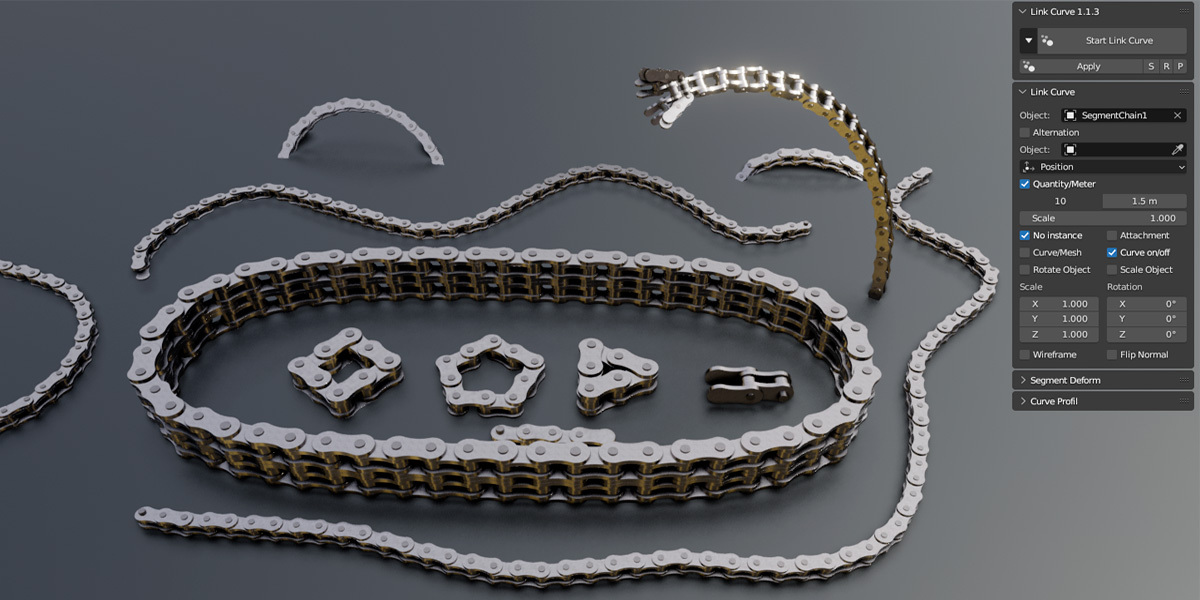
Link Curve is a Blender add-on built on Geometry Nodes for placing segments along a curve. Segments can follow the curve without deformation or use controlled deformation. The workflow is suited to chains, tank tracks, corrugations, tires, flexible shapes and cylindrical parts made without cylinders.
Control placement along a curve
The add-on connects objects to a curve and provides controls for quantity, alternation and position. You can also set global scale and rotation, choose instance or no-instance placement, and adjust object scale. These controls help when arranging repeated parts or changing their orientation along a path.
Deform segments and profiles
Link Curve includes segment and object deformation controls. The product listing records that version 1.1.2 expanded axis control to deform two connected objects at once; its tutorial describes using constraints to restore the mapping of geometry that should remain undeformed. Geometry Nodes primitives can be deformed while keeping access to the segmentation setting. The deformation function can also be reused on a normal object after application. Segment and object deformation require mesh Edit Mode, where a deformation limit is available.
The product listing's version 1.2.0 update added 2D profile support and a panel option to disable warp center locking. Its version 1.3.1 update added an animation panel for setting movement speed along a path, such as a tank track.
Compatibility and setup
The Superhive listing identifies Blender versions 4.5 through 5.3 and a GPL license. Check the product listing for current compatibility and release details. The product documentation covers segment deformation, curve profiles, single-object deformation and deformation limits. The product FAQ includes profile and update troubleshooting.