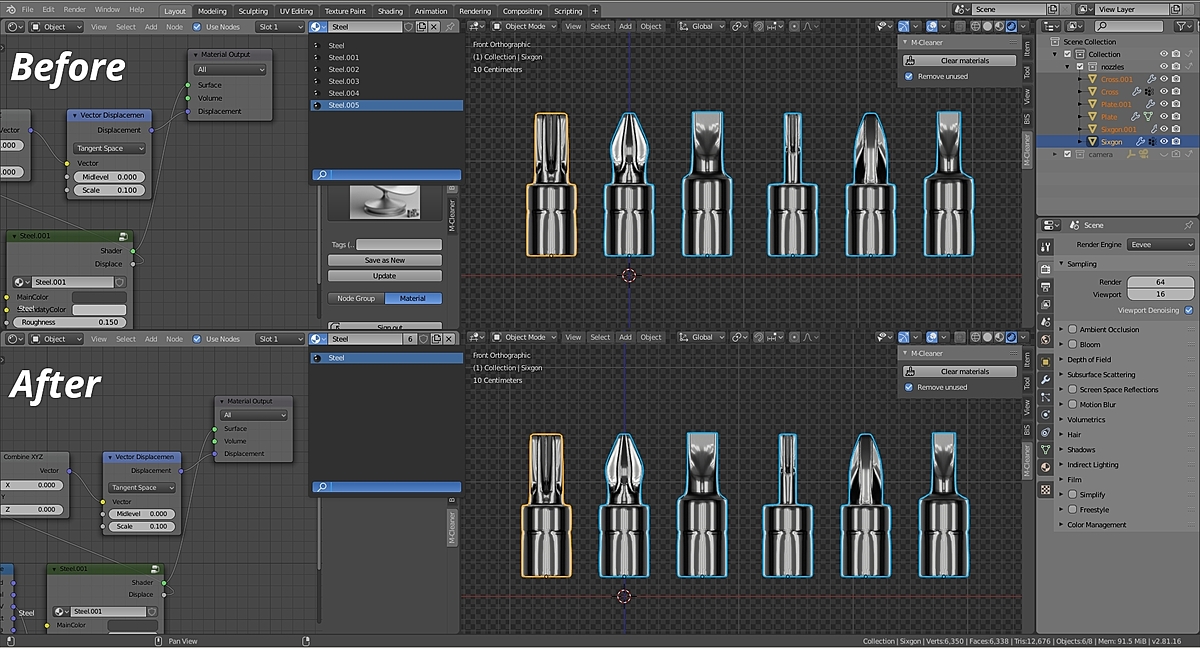
M-Cleaner is a Blender add-on by Nikita Akimov that finds equal materials in a scene and reassigns their objects to one unique material. It is aimed at scenes that collect duplicate materials when you add objects from saved blend-files, external libraries, or asset and kitbash sets.
Run the cleanup with the Clear materials button in the 3D Viewport's N-panel, under the M-Cleaner tab. With Remove unused enabled, duplicate materials are removed immediately. With it disabled, they remain with zero users for Blender's regular cleanup when the scene is saved.
Choose the cleanup mode carefully
The standard cleanup looks for equal materials. Merge by name instead acts on material names, including numbered suffixes such as .001 and .002. The developer labels this option destructive. Because it uses names rather than checking whether materials are equal, review similarly named materials before using it.
For complex materials, the product FAQ says the Node groups as nodes option can help when analysis is slow enough to block Blender. It limits analysis to the first level of material node trees and may be destructive, so check the result before relying on it.
Blender compatibility
The product listing identifies version 1.4.0 and lists Blender 2.90 through 4.1 as supported. It does not confirm compatibility with later Blender versions. Check the M-Cleaner product listing and its version notes for current details.