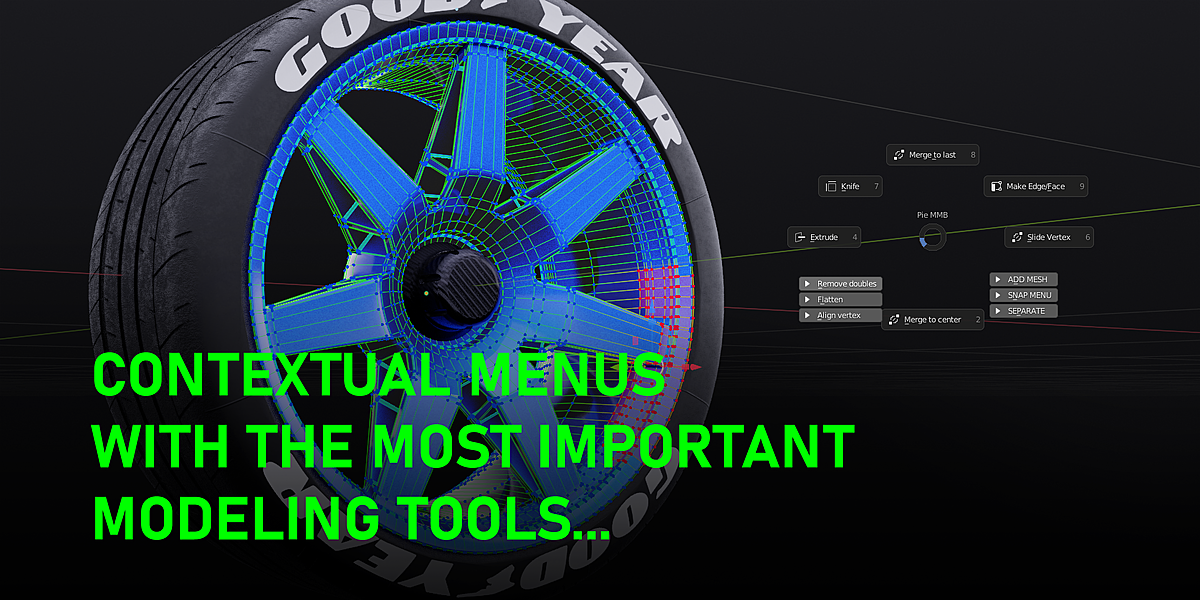
Marking Menus is a Blender add-on by ODI that opens pie menus from the 3D View. Press CTRL + SHIFT with one of the three mouse buttons to reach mode controls, contextual actions and interface settings. The menu layout follows ODI's modeling process.
Three menus for different tasks
Each mouse button opens a different menu. The left button opens the pick menu, which switches between Object and Edit modes and changes selection mode while editing. The middle button opens a contextual action menu that changes with the current mode. The right button opens the interface menu for controls such as gizmo visibility, face orientation and overlays.
This setup keeps these commands near the mouse while your other hand stays around CTRL and SHIFT. Review the menu actions against your existing shortcuts and modeling habits before making it part of a regular workflow.
Preset modifiers in Edit mode
The middle-button action menu includes a modifiers sub-menu in Edit mode. Its presets apply specific settings: Mirror has clipping enabled by default, Subdivision Surface creates a level 3 modifier the first time and then toggles between low and high poly, and Bevel uses two segments with a weight of one.
Shrinkwrap and Boolean use selection order. Shrinkwrap is applied to the last selected object with the previously selected object as its guide. Boolean cuts the last selected object using the previous selection. Check the selection order before applying either operation.
Blender version notes
The catalog identifies the add-on as version 1.0.1. The Superhive product listing names Blender 2.8 through 3.1 as compatible versions. It also gives a separate build note: use add-on version 1.0.2 with Blender 2.93, and version 1.0.1 for Blender versions below 2.93. Check the listing and its documentation for the build that matches your Blender version.
Who may find it useful
Marking Menus may suit Blender modelers who want mouse-driven access to mode switches, contextual tools and a small set of modifier presets. Since the menus reflect one developer's process, their arrangement may not match every workflow. ODI invites feedback about missing tools and says custom marking menus can be discussed separately as paid work.