Material Library, also listed as Material Library VX, is a community-maintained Blender add-on for saving, loading, and organizing materials you want to reuse across projects. The Blender Extensions listing identifies version 0.6.0 and requires Blender 4.2.0 or later.
Organize and apply materials
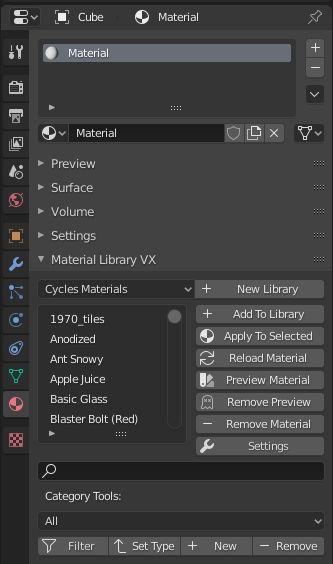
Set a library path in the add-on preferences, then create a named library. A new library starts with one material. Add materials to it, group them with categories or subcategories, and use the search and filter controls to find an entry later.
You can preview a selected material before applying it to the active object. The add-on also has a reload control that restores the saved version of a material. Its remove control deletes the active entry from the Material Library list and library, so check what is selected before using it.
How the library stores materials
The Blender Manual describes the library as using a .blend file as its database. The manual says this supports materials for external render engines, node materials, and textures. Keeping materials in a reusable library can help when you want to apply an existing setup instead of rebuilding it for each project.
Compatibility and first-use notes
The current Extensions listing sets the minimum version at Blender 4.2.0. The linked manual page documents the Blender 4.1 interface, so use the current listing to check compatibility with the extension release. The manual places the controls under Properties > Materials > Material Library VX and advises adding a Fake User to materials and saving the .blend file before use.