MAutoStereoFix is a stereo-processing plugin for recordings whose left and right channels differ in level, timing, tone or phase. MeldaProduction describes drum overheads and room microphones as intended uses, and says it can also process other stereo signals, including master tracks.
What it can correct
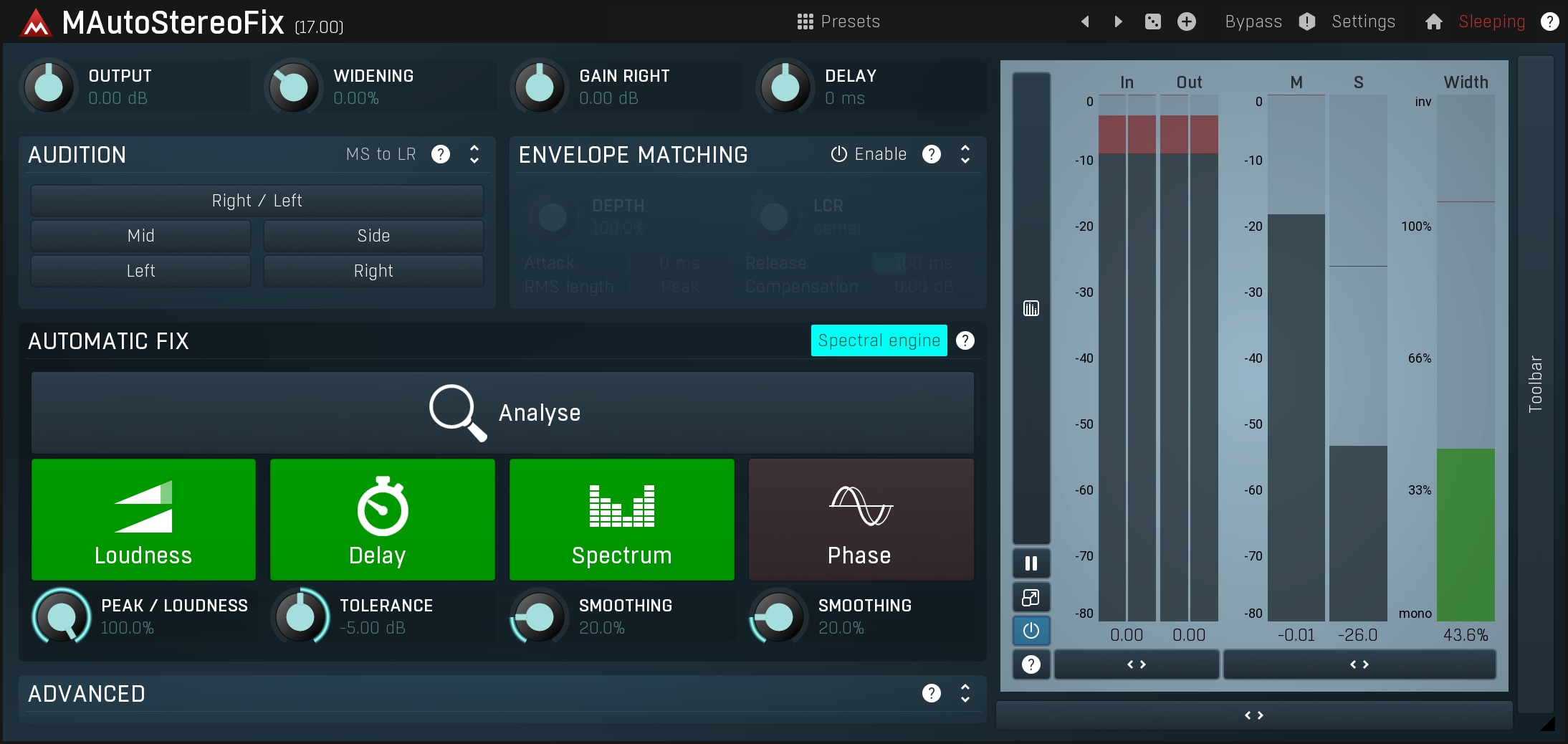
After analyzing the audio, you can enable correction stages separately. The plugin can balance channel loudness, adjust timing and polarity, match the right-channel spectrum to the left with linear-phase equalization, and compensate spectral phase differences. An envelope-matching section can also follow one channel's level over time, which may help when microphones capture different amounts of ambience, especially on percussive material.
The level and delay/polarity fixes use gain, delay and polarity changes. Spectrum and phase correction alter the signal; both require the spectral engine and introduce latency. Phase correction can affect transients, so the manual recommends adjusting its threshold and smoothing controls if you hear unwanted changes. Spectrum smoothing can also help when the correction smears percussive transients.
Analyzing a recording
Start playback in your host, then press Analyse. Choose a representative section where the recorded instruments are audible without an unusually dominant sound. Different sections can produce different analysis results; for example, a loud ride cymbal near one overhead mic can skew the correction applied across the track. The manual says 10 to 20 seconds is often enough. It allows you to proceed after 20% analysis, though the results may be less accurate; 100% is described as the reasonable minimum.
Use the audition controls to listen to the left or right channel, swap them, or monitor the mid and side signals. MeldaProduction recommends headphones when checking the stereo field. The plugin also has a widening control that adjusts the existing stereo field and is mono-compatible; large amounts can sound unnatural or tiring, so use it cautiously.
Fit and limitations
MAutoStereoFix is suited to balancing stereo recordings when differences between two channels shift the apparent center or create phase problems. It cannot repair poor room acoustics, extreme microphone placement or other differences such as a longer instrument sustain in one channel. Listen to the corrected track in context and adjust or disable individual fixes when they change the sound in an unwanted way.
Compatibility and licensing
| Platform | Requirements and plugin formats |
|---|---|
| Windows | Windows 10 or 11, 64-bit; Intel or AMD processor with SSE2; VST, VST3 or AAX host. |
| macOS | macOS 10.14 or newer, 64-bit; Intel, AMD or Apple Silicon processor; VST, VST3, AU or AAX host. |
| Linux | Not directly supported. MeldaProduction says it may work through Wine and notes that Microsoft TrueType fonts must be present in Wine's Windows Fonts directory. |
The developer says activation does not require a dongle or an internet connection. The licence is assigned to a person, who may use the software on their own computers. See the MAutoStereoFix manual for control details and the system requirements for host compatibility information.