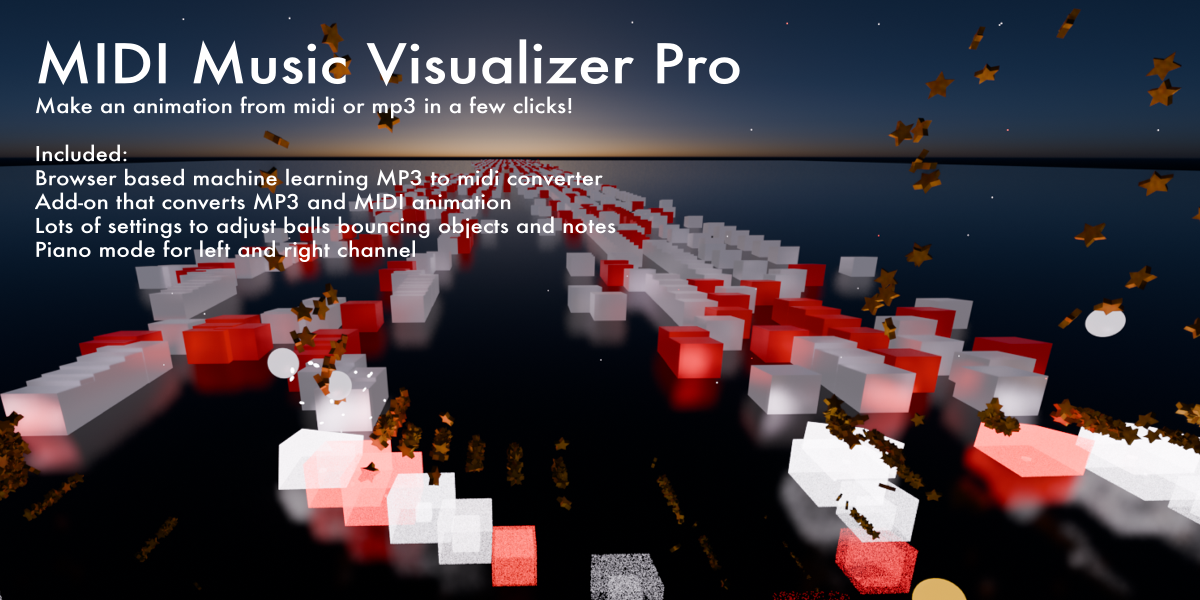
MIDI Music Visualizer Pro is a Blender add-on that turns MIDI note data into animated 3D scenes. Its product listing describes one-click geometry generation, dynamic materials, and keyframes for music videos, VJ loops, and social media promos.
Choose a layout and movement style
The listing describes Side-Scroller, Piano Roll, and Waterfall layouts, plus a Piano Mode that splits the main channel between left and right hands. Movement options include Bouncing Arcs, Roll & Glide, Meteor Drop, Piston Strike, and Laser Beam. Bouncing Arcs use parabolic paths with mid-air flips and squash-and-stretch motion; the other options provide different ways for animated objects to move between notes.
Add effects and customize the scene
Geometry Nodes effects can show floating note names or custom objects, draw Chord Webs between notes played at the same time, and leave fading Action Trails behind moving objects. The listing also describes a Ripple Floor, bass-responsive Procedural Mountains, kick-drum shockwaves, and debris particles.
For the visual style, choose built-in shapes such as boxes, cylinders, pyramids, or toruses, or use custom 3D objects for notes and hitters. Material presets include Neon, Metallic, Diffuse, and Glass. Color can come from a curated palette or custom hex codes mapped by pitch or MIDI channel. The listing also describes notes that morph or shatter on impact.
Understand the file workflow
The documentation quick start begins with a MIDI file and lets you add an MP3 as an optional audio track for synchronization. The product listing says the package also includes a browser-based MP3-to-MIDI converter. Choose a layout and color theme, then generate the animation.
Check compatibility and installation details
The marketplace details list Blender 4.0–5.0 and support for Eevee and Cycles. The product overview also says Blender 3.6 and up, while the documentation recommends Blender 4.0 or later. Check the current listing and documentation for your installed version. The docs describe installing the add-on through Blender Preferences, enabling “Animation: MIDI Music Visualizer,” then opening the MusicGen tab in the 3D Viewport sidebar.
The two product pages give different names for the Python add-on file: the overview lists midi-music-visualizer-pro.py, while the documentation names blender_midi_gen_advanced.py. Use the filename in the current download and consult the linked documentation if the package differs. The docs also state that the add-on requires the mido library and attempts to install it the first time you generate an animation.