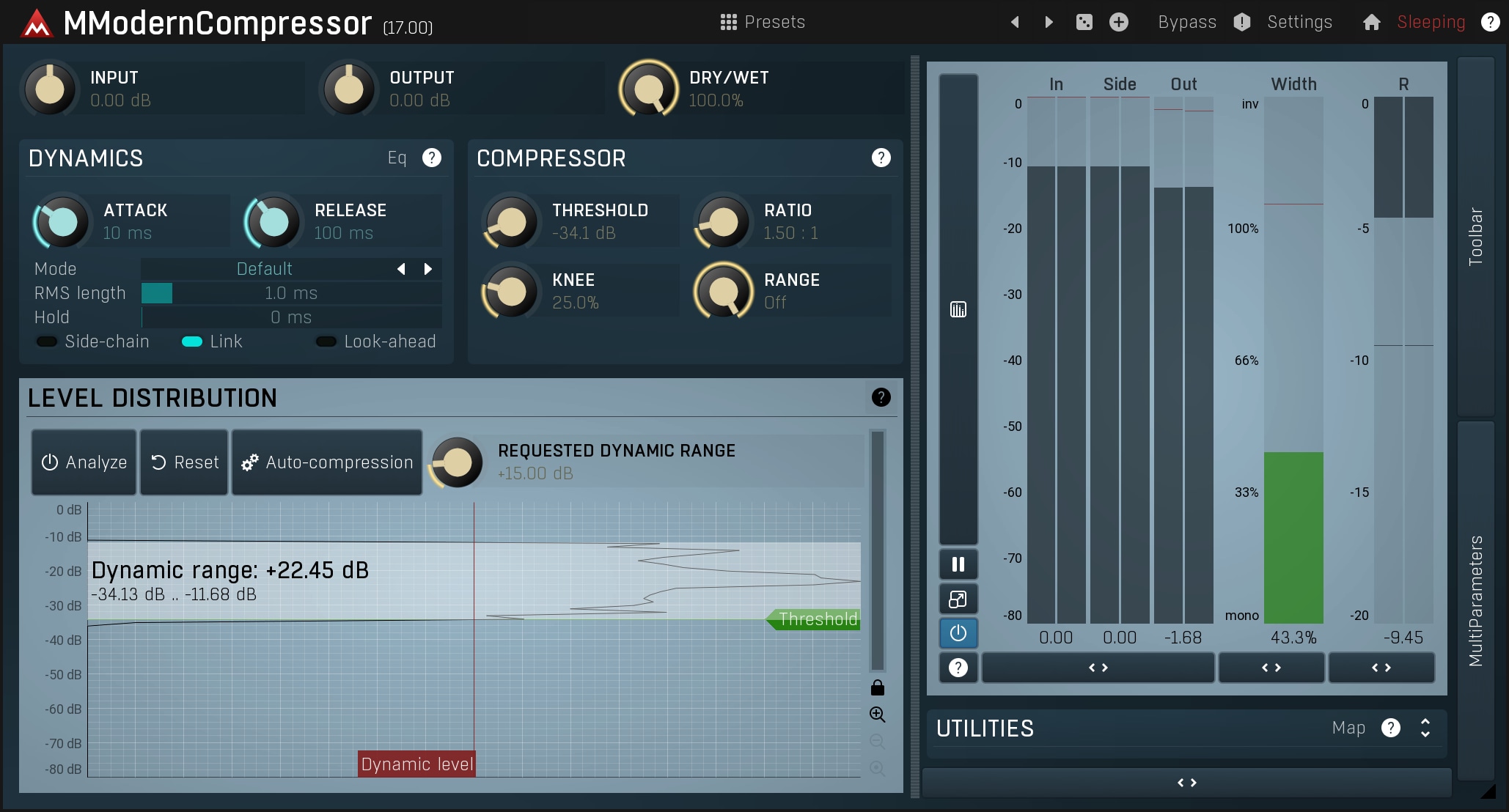
MModernCompressor is MeldaProduction’s compressor plugin for reducing dynamic range. Its level-distribution analyzer measures audio you play; after you choose a requested output dynamic range, auto-compression adjusts threshold and ratio to approximate it. The detector settings affect the level distribution shown in the graph.
Set compression from the audio
Enable analysis and play the material you want to compress. For overall song dynamics, Melda recommends analyzing the full song; for smaller-scale dynamics, an average section of the arrangement may be enough. When analysis is complete, set the requested output dynamic range and run auto-compression. The plugin adjusts threshold and ratio to reduce the measured range. Compression can reduce dynamic range, but it cannot increase it.
Changing detector settings invalidates the level-distribution analysis. Reset the graph and analyze again before using auto-compression. You can also use the graph to inspect which levels occur most often and adjust the threshold manually.
Shape what the compressor responds to
The detector has peak and RMS behavior, attack and release controls, look-ahead, and additional modes. A peak detector can follow individual transients, which is useful on percussive material. RMS smoothing averages level changes and responds more slowly, a behavior the guide describes as useful for subtle mastering work.
The sidechain equalizer changes the signal entering the level detector, not the processed output. For example, a low-pass filter around 100 Hz can make the detector respond more to kick drum energy. Look-ahead can help the detector respond to fast transients, but it introduces latency. For details on these controls, see the MModernCompressor quick-start PDF.
Compare settings and check output
Automatic gain compensation adapts the output level to the current settings so you can compare changes without mistaking louder playback for better sound. A safety limiter keeps output below 0 dB. The meters show input, output, and gain reduction; the stereo-width meter requires at least two channels, while time-graph mode shows these values over time. The dry/wet control blends the unprocessed and compressed signals for parallel compression.
The A-to-H controls let you copy and switch settings among up to eight plugin instances; the X-Y pad can morph among the first four slots. MIDI learn lets a MIDI controller or keyboard control plugin parameters in real time, and a multiparameter can control several parameters from one control. MModernCompressor processes mono and stereo, mid/side, up to eight-channel surround, and up to 64-channel ambisonic audio.
Formats and system requirements
Melda lists 64-bit VST, VST3, and AAX support for Windows 10 and 11. On macOS 10.14 Mojave or newer, it lists 64-bit VST, VST3, AU, and AAX support. Linux is not directly supported, though Melda says the plugins may run through Wine if .wine/drive_c/windows/Fonts/ contains Microsoft True Type Fonts. Check the product support page for installation information and the system requirements page for host details. Melda offers a trial and recommends using it to check compatibility when a computer is below the listed minimum requirements.
Activation uses licence files and does not require a dongle or internet access. Melda says a licence is assigned to the user and can be used on that user’s computers. The feature page also states that purchases include free updates for life.