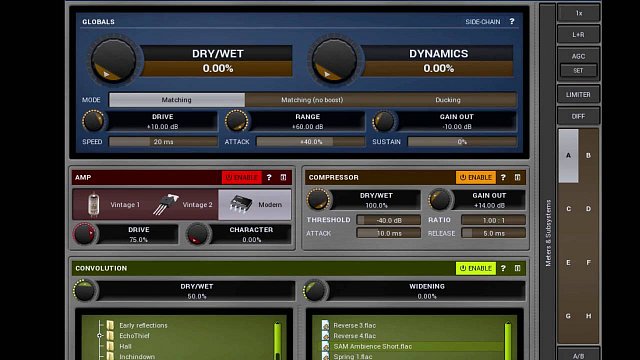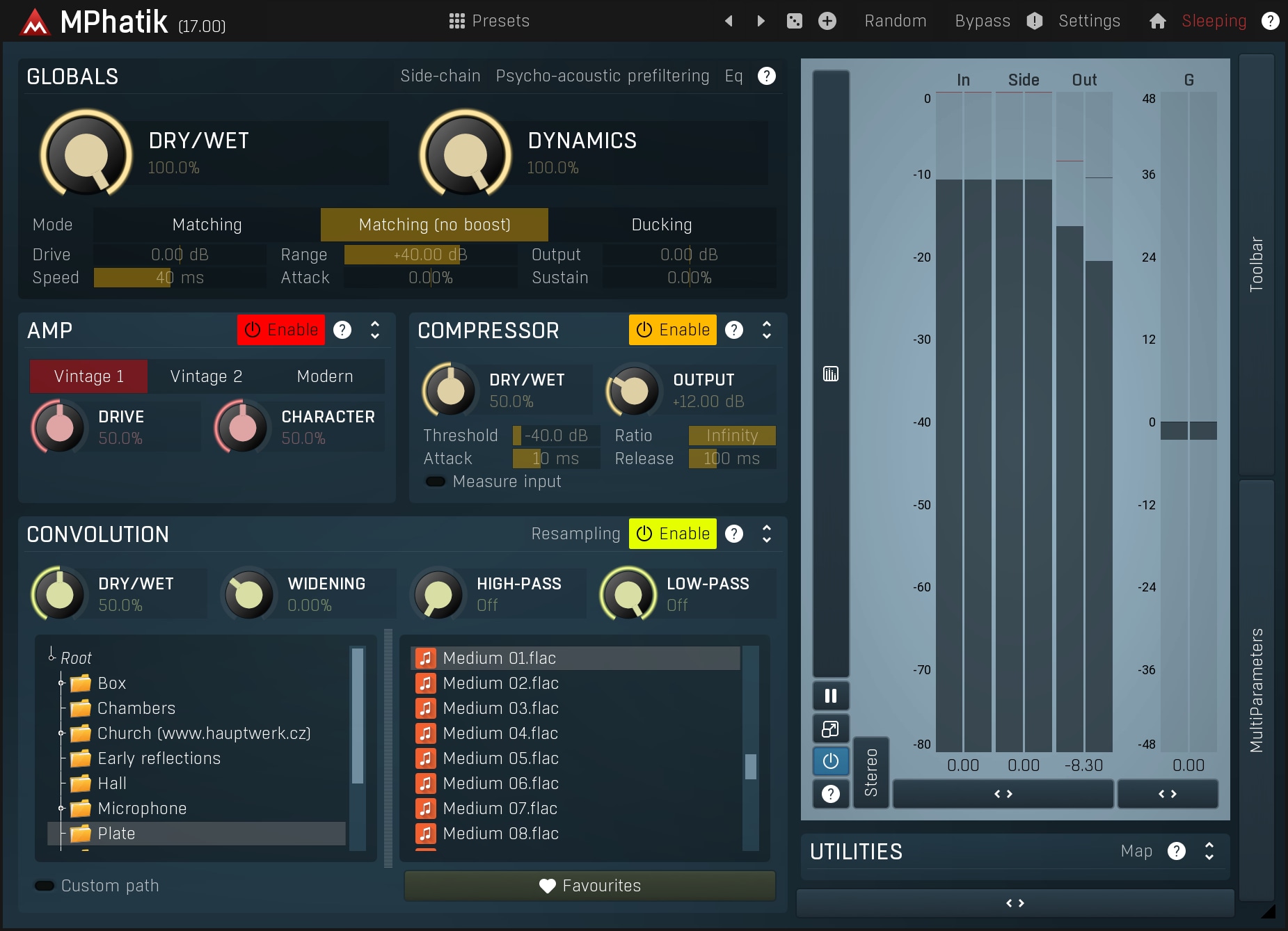
MPhatik is a dynamics-focused multi-effect that combines an amp simulator, convolution reverb and a compressor while controlling the signal's level envelope. In Matching mode, it measures the original input or a side-chain reference, processes the audio, then adjusts the processed signal so its envelope follows that reference. The integrated chain runs amp, convolution, then compressor.
Match or reshape the dynamics
In Matching mode, MPhatik aims to restore the input envelope after processing. The Dynamics control sets how much matching is applied, while Matching (no boost) avoids increasing the output level. Attack and Sustain controls let you alter the transient and tail instead of only restoring them. Ducking mode lowers the processed output when the reference level increases.
This two-envelope approach supports workflows that a conventional gate or compressor cannot reproduce in the same way: those tools generally follow one detector, while MPhatik compares the reference and processed signals.
Use a side-chain for other effects or tracks
For external processing, place MPhatik after your own effects, route the pre-effect signal to its side-chain input, enable side-chain processing and disable the built-in effects if needed. The routing steps depend on the host. This lets MPhatik restore the original envelope after distortion or another effect without using its integrated amp, reverb and compressor.
A different track can provide the reference. For example, a drum track can shape a pad's level into a rhythm, or a better-sounding drum microphone can supply the envelope for another mic track. To duck a bass or drum sound, send the triggering track to the side-chain and select Ducking; the Range control sets the gain range used for that response. The MPhatik quick start guide describes these routing examples.
Shape the sound and compare settings
The amp simulator adds distortion, while the convolution processor includes impulse responses for plates, rooms, halls and box simulations. You can also load your own impulse response files. The compressor follows the other two processors in the signal path. MPhatik also provides A-H settings for comparison and an XY pad to morph among the first four slots. Automatic gain compensation helps keep the output near the input level while you compare settings. A brickwall limiter keeps the output below 0 dB.
Channels, formats and licensing
MPhatik supports mono, stereo, mid-side and separate left/right processing, plus up to 8-channel surround and 64-channel ambisonics. Adjustable upsampling from 1x to 1024x is available for nonlinear processing such as saturation.
The developer lists 64-bit VST, VST3 and AAX support on Windows 10 or 11, and VST, VST3, AU and AAX support on macOS 10.14 or newer. Linux is not directly supported; MeldaProduction says running through Wine may be possible. Check the MPhatik support page and system requirements for host and installation details. MeldaProduction says activation uses licence files and requires neither a dongle nor internet access. The licence is issued to a person, who can use it on their own computers.