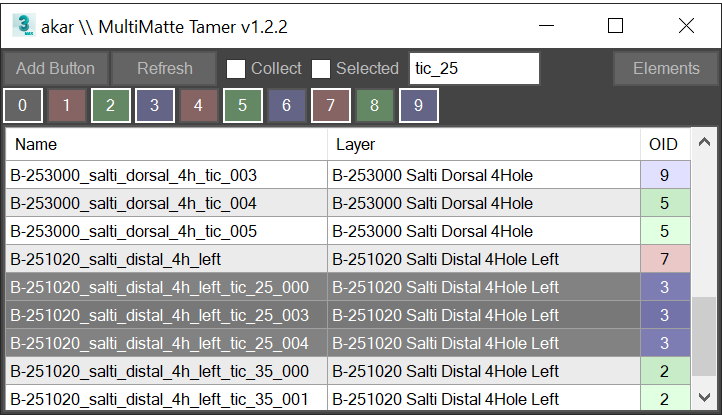
MultiMatte Tamer is a MaxScript by secondplace for assigning Object IDs and creating V-Ray MultiMatte Render Elements in 3ds Max. Objects appear in a grid table. The GitHub project README notes that the script has limited use when it cannot recognize scene objects and layers by name.
Assigning IDs and refreshing the grid
Add Button adds another numbered ID button. Refresh reloads scene objects and recognizes IDs changed manually, adding buttons as needed. In version 1.2.4, ID assignment changed to use unique identifiers instead of names.
Selecting objects and creating elements
- Selected limits the grid to objects currently selected in the scene.
- The Filter input selects matches in the names column.
- Collect uses all RGB slots rather than sequential slots. When it is checked, Elements creates render elements accordingly from the selection.
Double-clicking a cell selects objects with the same Object ID, all items in a layer, or related names ending in a number in the corresponding column.
V-Ray requirement
V-Ray is required to create MultiMatte Render Elements because MultiMatteElement is part of V-Ray. If that element is unavailable, the Elements button is hidden. Object IDs can still be set, so ID assignment does not depend on render-element creation.
Version and compatibility
Version 1.2.4 added HD mode and changed ID assignment to use unique identifiers. The ScriptSpot listing records 3ds Max 2020, 2023, and 2024 as tested and lists V-Ray as required. For other 3ds Max releases, check the project details and test the script with a representative scene.