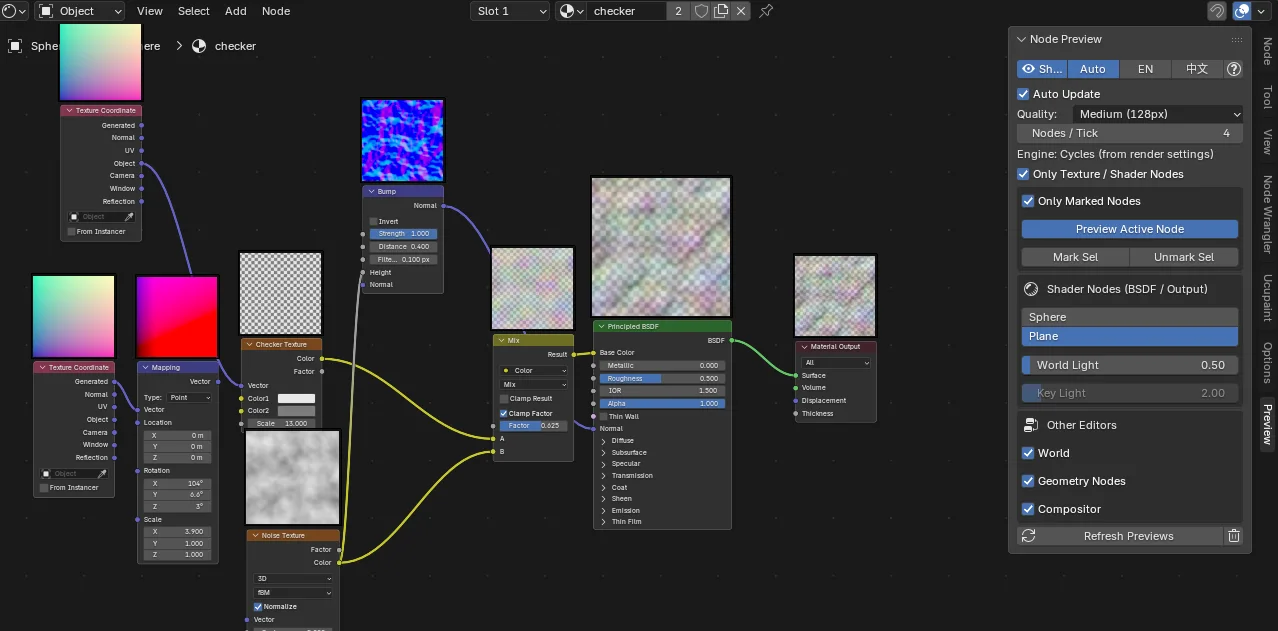
Node Preview Thumbnails adds rendered thumbnails above shader, geometry and compositor nodes in Blender. Version 1.5.0 lists Blender 5.2.0 as its minimum supported release.
Choose which nodes to preview
On a large node tree, set Preview Scope to Selected to preview selected nodes, or Marked to preview only nodes you have marked. Mark a node with its right-click menu, or use the Mark Sel and Unmark Sel buttons in the Preview panel.
Adjust preview updates
- Set Quality to Low for 64-pixel thumbnails that render faster.
- Turn Auto Update off and press Ctrl+Alt+R when you want to refresh previews manually.
- Set Time Budget to about 50 ms and Nodes / Tick to 1 to divide updates into smaller steps. A single node render cannot be split across steps.
- Press Ctrl+Alt+P to toggle all previews on or off.
Compositor previews and performance
In version 1.5.0, compositor previews render the 3D scene once, then recomposite each node from that render. The add-on listing reports that a full refresh on the developer's heavy test scene took about 9 seconds, down from about 75 seconds. That is one reported test result, not a benchmark for every scene.
Compositor Scene Cache is set to Simple by default. Switch it to Off if a preview looks out of date. For large node groups, turn off Inside Node Groups when you do not need previews within them. Previews use the scene's render engine; the listing notes that Cycles can be heavier than EEVEE on a slow CPU.
Compatibility and installation
The official Node Preview Thumbnails listing provides release details and downloads. Its catalog record lists the Blender version requirement and file permissions, including temporary preview renders and PNG export of node previews. Blender's Install from Disk instructions cover installing an extension from a downloaded archive.