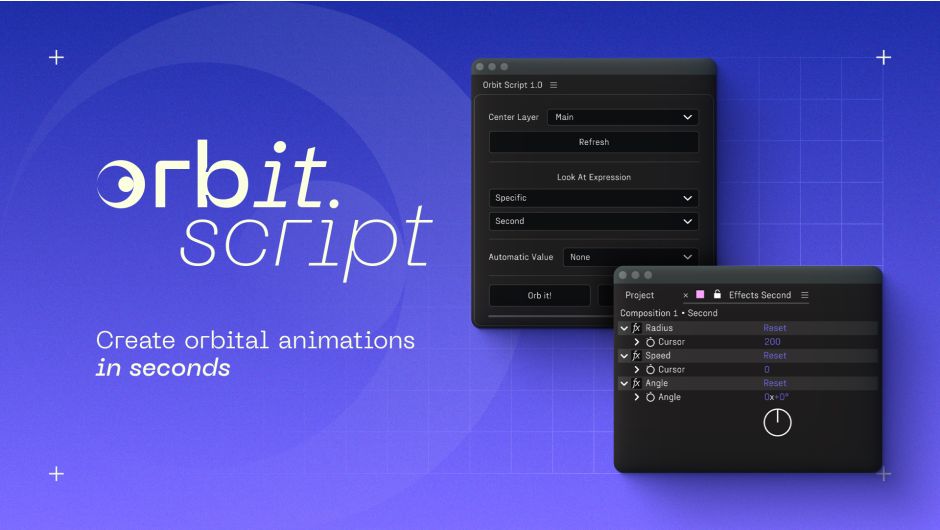
Orbit Script is an After Effects script by Hugo Castetbon for attaching orbital motion to one or more layers around a chosen center layer. It adds per-layer controls for adjusting the orbit, with a position expression described as keyframe-ready.
Set up an orbit around a pivot
Choose a layer from the Center Layer menu, select the layer or layers to animate, then click Orb it! Orbit Script applies the setup to the selection. This suits compositions where elements need to travel around a fixed visual center.
Adjust the orbit controls
Each selected layer gets Radius, Speed and Angle controls. Radius sets the distance from the pivot, Speed sets the angular rate, and Angle sets the phase or offset. The product also includes smart Look-At options. The generated setup is described as fully keyframe-ready, so you can refine its motion with keyframes in the composition.
Use Auto Radius with shape layers
Auto Radius can calculate an Inside or Outside radius for an ellipse or a circle-like rounded rectangle. It uses the shape's size and stroke width to set the distance between the center and the selected layer. The product listing describes this as an optional setting.
Install Orbit Script
The package includes a .jsxbin script panel and a quick guide PDF. The installation guide contains mini demo project instructions and a download link for the .aep file. The aescripts + aeplugins manager is the listed installation and licensing option. For manual installation, copy the file into After Effects' Scripts/ScriptUI Panels folder, restart After Effects, then open Window > Orbit Script 1.0.
The listed compatible After Effects versions are 2020 through 2026. Version 1.0 is the initial release, dated December 9, 2025. Visit the Orbit Script listing on aescripts for the free trial, current offer and product details.