FabFilter Pro-R 2 is an algorithmic reverb plug-in for adding room ambience, longer hall tails or designed reverb to a mix. Its Modern, Vintage and Plate styles cover natural spaces, classic digital reverb character and metallic plate tones. It suits producers and mix engineers who want to shape a reverb tail in detail or use the same plug-in for stereo and immersive sessions.
Set the space, then shape the decay
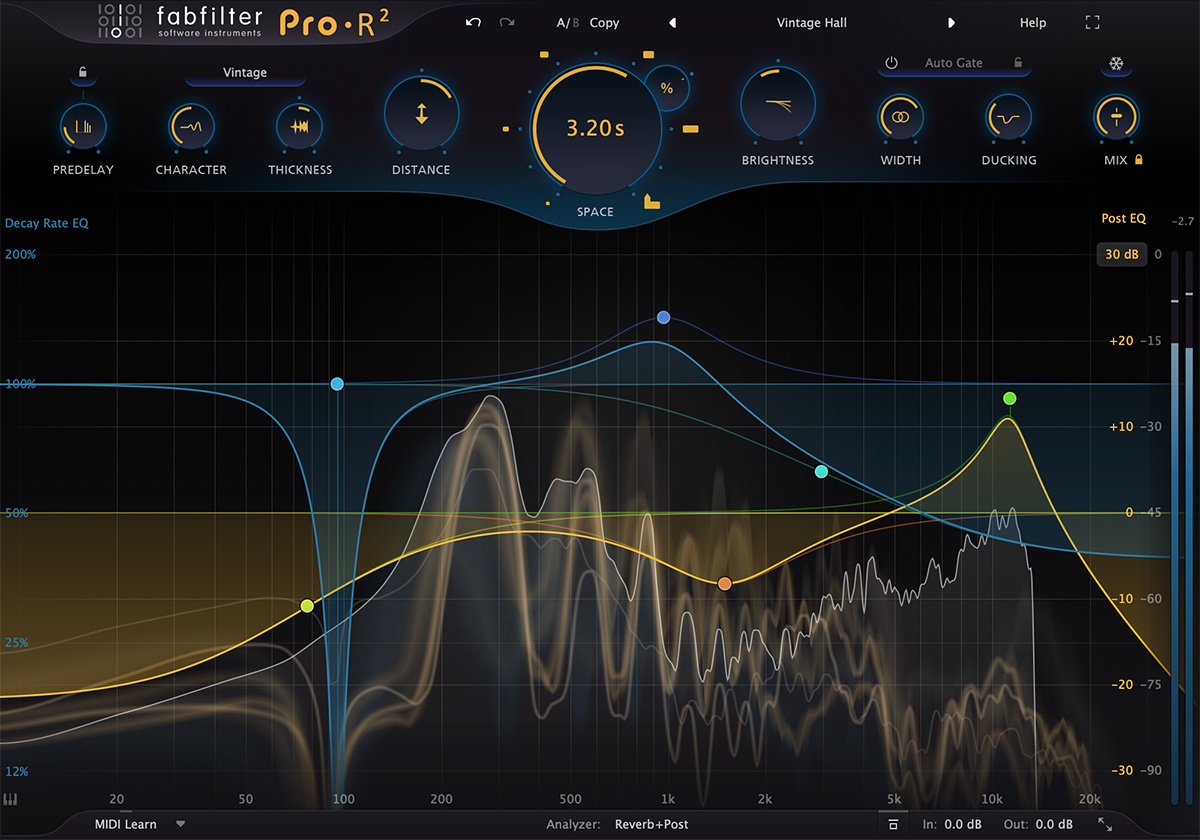
The Space control blends across more than a dozen room models and adjusts the decay to suit the selected space. FabFilter describes a range from a small 200 ms ambience to a ten-second cathedral tail. Decay Rate scales the selected Space decay from 25% to 400%, so you can adjust the tail length without changing models. Predelay adds separation between the dry sound and the reverb; it can sync to host tempo, which is useful when keeping a vocal or transient clear without lengthening the whole tail. The main controls help explains these adjustments.
Decay Rate EQ and Post EQ solve different problems. Decay Rate EQ changes how long different frequency ranges ring, using up to six bell, shelf or notch curves. Post EQ shapes the tone of the finished reverb with up to six bands, and Pro-R 2 compensates the reverb gain as you adjust them. Its spectrum display also visualizes decay across frequencies. See FabFilter's Decay Rate EQ and Post EQ documentation for the controls.
Fit the reverb into a mix
Character moves from a clean, predictable decay toward stronger early reflections, late echoes and chorus-like modulation. Thickness changes density and saturation. Ducking responds to the plug-in input to separate wet and dry signals, a workflow FabFilter calls useful for vocals. Auto Gate is tuned for separate drum sounds, and Freeze holds the current reverb tail until you turn it off. These controls give vocal and drum mixes ways to manage the tail without adding a separate gate or ducking plug-in.
Import impulse responses and work in surround
You can import WAV or AIFF impulse response files through the preset browser or by dragging them onto the plug-in. Pro-R 2 remains algorithmic: it converts an imported response into Decay Rate EQ, Post EQ and main-control settings for an approximate, editable match. FabFilter says the result will not match the original response perfectly; sine-sweep files are not properly interpreted. Read the impulse response import help if this workflow matters to you.
For surround and immersive work, Pro-R 2 supports layouts up to 9.1.6 Dolby Atmos, depending on the DAW and plug-in format. In multichannel layouts, you can target decay and Post EQ curves to selected speaker groups; Post EQ also has left, right, mid and side options. See the surround and Dolby Atmos help for the available controls.
Compatibility and licensing
FabFilter lists desktop versions in VST, VST3, Audio Units, CLAP, AAX Native and AudioSuite formats. Its stated requirements are Windows 11, 10, 8, 7 or Vista (32-bit or 64-bit) with a VST 2/3 or CLAP host or Pro Tools; macOS 10.13 or later (64-bit, Intel or Apple Silicon) with AU, VST 2/3 or CLAP support or Pro Tools. An AUv3 version is available for iPad. FabFilter offers a 30-day fully functional trial. A standard personal license can unlock the plug-ins on up to three computers used by the license holder, and commercial use is allowed. FabFilter uses its own license key system rather than iLok authorization.