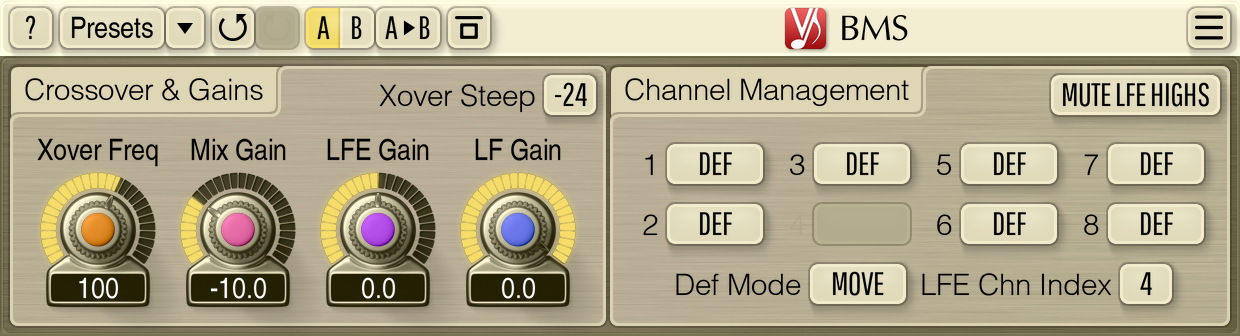
Voxengo BMS is a bass-management plug-in for mastering and monitoring 2.1, 5.1, and 7.1 surround mixes. It extracts low-frequency content below an adjustable crossover point from non-LFE channels. You can listen to that content through the LFE path or route it to the existing LFE channel, with control over the crossover frequency and slope.
Channel routing and monitoring
BMS lets you choose how each channel's low frequencies are handled. Move sends them to the LFE channel and removes them from the source channel. Mix copies them to LFE and leaves them in the source channel; LF Gain can lower their level there. Mon sends low-frequency content from channels set to Mon to LFE and solos those channels, while muting the original LFE signal and high-frequency content on all outputs. Bypass leaves it unchanged; Mute removes it from that channel.
BMS works with an LFE channel already present in the session. It cannot create a new channel. To build an LFE channel from stereo or 5.0 stems, first add an empty, silent LFE channel, then use BMS on the resulting 2.1 or 5.1 mix.
Compatibility and trial use
Voxengo lists Mac downloads for AU, AAX, and VST3, and Windows downloads for VST, VST3, and AAX. The installation guide specifies macOS 10.12 or later on 64-bit Intel or Apple Silicon, and Windows plug-ins for 32-bit or 64-bit audio hosts. AAX use requires Pro Tools 12 or later; Voxengo lists a 2.5 GHz dual-core processor or faster and at least 4 GB of RAM, and other hosts must support the installed plug-in format.
BMS is offered as trial software. In demo mode, its output is briefly muted every 45 seconds. Demo authorization uses a product key and requires no dongle, challenge-response, or connection to Voxengo's website. The plug-in has zero processing latency and supports all sample rates.