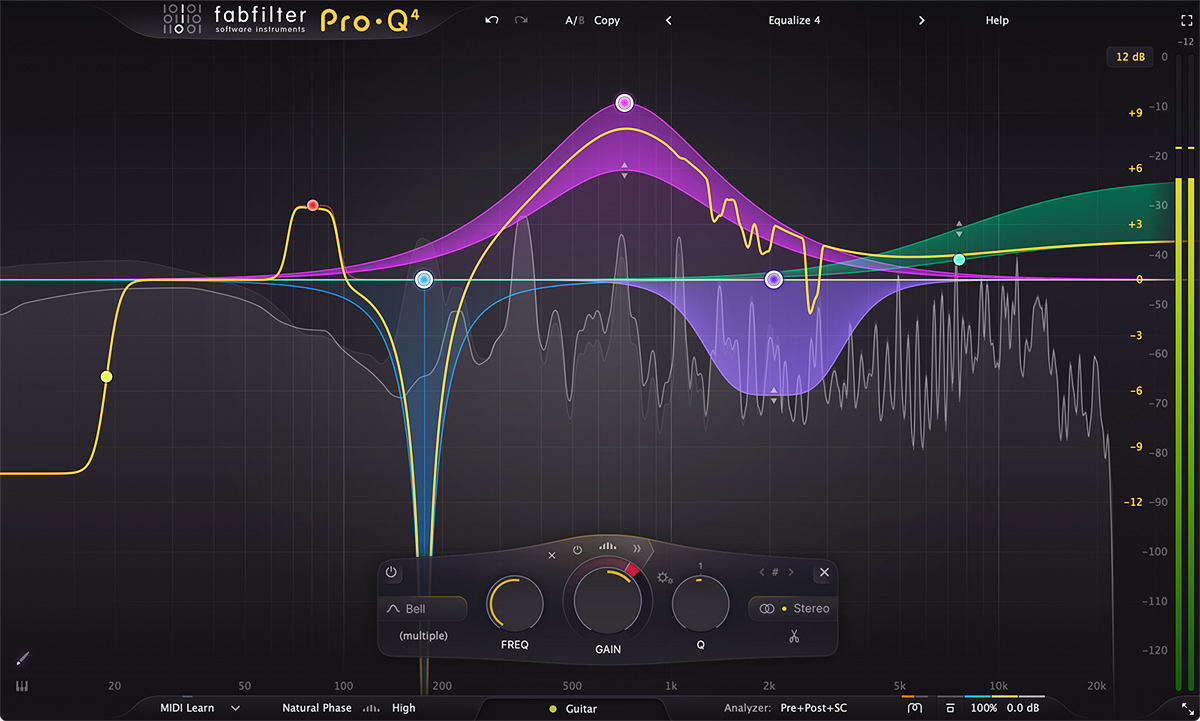
FabFilter Pro-Q 4 is an equalizer plug-in for mixing and mastering, with up to 24 bands, an interactive EQ display, and a built-in spectrum analyzer. It suits engineers who need detailed tonal or corrective EQ alongside dynamic processing, mid/side control, or surround work. The Instance List provides a session-wide view for editing Pro-Q 4 curves and accessing other supported FabFilter instances.
Shape an EQ curve and refine it
Pro-Q 4 includes Bell, Notch, High/Low Shelf, High/Low Cut, Band Pass, Tilt Shelf, Flat Tilt, and All Pass filters. EQ Sketch turns a left-to-right drawing gesture into a set of EQ bands that you can adjust individually. FabFilter describes Sketch as a quick way to create a broad starting curve, rather than a way to set precise band values.
Spectrum Grab lets you select peaks in the live analyzer and adjust them. EQ Match can match the spectrum of another Pro-Q 4 instance or an external signal. The analyzer can show pre-EQ, post-EQ, and external spectra, and includes frequency collision detection for comparing signals as you work.
Choose between dynamic and spectral EQ
Dynamic EQ is useful when a frequency needs correction only at certain moments. On Bell and Shelf bands, Pro-Q 4 can change gain when the signal crosses a threshold. You can adjust attack and release, use side-chain filtering, or trigger the band externally.
Spectral dynamics responds more selectively: it acts on frequencies within a band that cross the threshold, leaving other frequencies in that band alone. FabFilter describes it as a way to treat changing problem frequencies such as harshness in vocal or guitar recordings. Threshold, attack, and release can be automatic or adjusted manually; a density control sets how narrowly the processing targets frequencies. Spectral processing uses linear-phase processing on the selected band, so it adds latency that varies with the chosen resolution.
Set phase, stereo, and surround behavior
Zero Latency mode avoids plug-in latency and uses efficient processing. Natural Phase follows an analog-style phase response without the long latency associated with linear-phase processing. Linear Phase leaves phase unchanged, but adds latency and can introduce pre-ringing, so its adjustable resolution is a practical consideration for timing-sensitive sessions.
Each band can process mid or side, left or right signals. For immersive work, Pro-Q 4 supports surround formats up to Dolby Atmos 9.1.6, depending on the DAW and plug-in format. Its surround controls let you select speaker groups or individual speakers for a band.
Edit multiple instances in a mix
The Instance List opens from a Pro-Q 4 interface and shows Pro-Q 4, Pro-C 3, Pro-DS, and Pro-G instances in the session. At higher zoom levels, you can edit EQ curves in the list and use EQ Sketch. It can also show frequency collisions against a selected reference track. Track order and color information depend on the DAW and plug-in format, so the list may behave differently across hosts.
Check compatibility and licensing
FabFilter lists VST, VST3, Audio Units, CLAP, AAX Native, and AudioSuite formats; your DAW must support a compatible format. The listed requirements are Windows 11, 10, 8, 7, or Vista in 32-bit or 64-bit, or macOS 10.13 or later in 64-bit on an Apple Silicon or Intel processor. FabFilter offers a fully functional 30-day trial.
A standard FabFilter license is personal and can authorize the plug-ins on up to three Windows or macOS computers, as long as the licensed user is the person using them. Studios with multiple users or rooms need a multi-seat site license. FabFilter also lists a separate Pro-Q 4 iPad app.