Qol Tools: Camera Bookmarks is a Blender add-on for saving camera and viewport angles so you can return to them while exploring a scene. Create bookmarks without keying or animating, then switch between saved views with a click.
Save and restore camera views
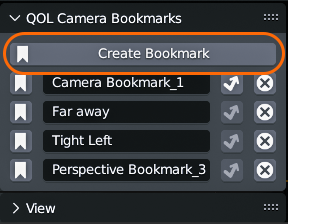
When you add a bookmark, the add-on detects the active 3D view and creates either a perspective or camera bookmark. Restoring a bookmark switches to the matching camera type and restores the saved view settings. The bookmarks are saved with the Blender file, and the creator says they do not affect animations.
You can create as many bookmarks as you need, name them, update a saved view with the up-arrow control, or delete entries. This is useful when you want to compare several angles without repeatedly navigating away from and back to a preferred view.
Choose where the controls appear
The panel can appear in Blender’s N-Panel or Properties panel, selected in the add-on preferences. A mini button is also available when the panel is closed: click it to cycle through bookmarks, or Ctrl-click it to create one. That keeps quick access available when you want less interface on screen.
Check Blender versions and format
Superhive lists compatibility with Blender 3.2, 3.3, 3.4, 3.5, 3.6, 4.0, 4.1, and 4.2. Its version notes identify version 2.0.0 as the extension format for Blender 4.2 and later, and version 1.5.2 as tested and compatible with Blender 3.6. Check the version offered for your Blender installation before downloading. The listing marks the add-on as Blender Extension compatible and identifies its license as GPL. See the version history and product details for those notes.
Compare it with Blender’s included option
The creator’s listing notes that Blender includes a free camera bookmarks add-on. It describes the mini button and hotkey capability as differences in Qol Tools: Camera Bookmarks. If you only need saved views, compare the included option with the controls you want before choosing. For current availability and product information, visit the creator’s product listing.