Quake Motion Camera is a Blender add-on by EdenWeby 3D for adding procedural movement and shake to scene cameras. It includes ready-made camera styles, controls for adjusting movement, and tools for working with camera animation. The add-on generates motion through its panels, so you can start with a preset or a button and then adjust the result.
Camera motion and shake controls
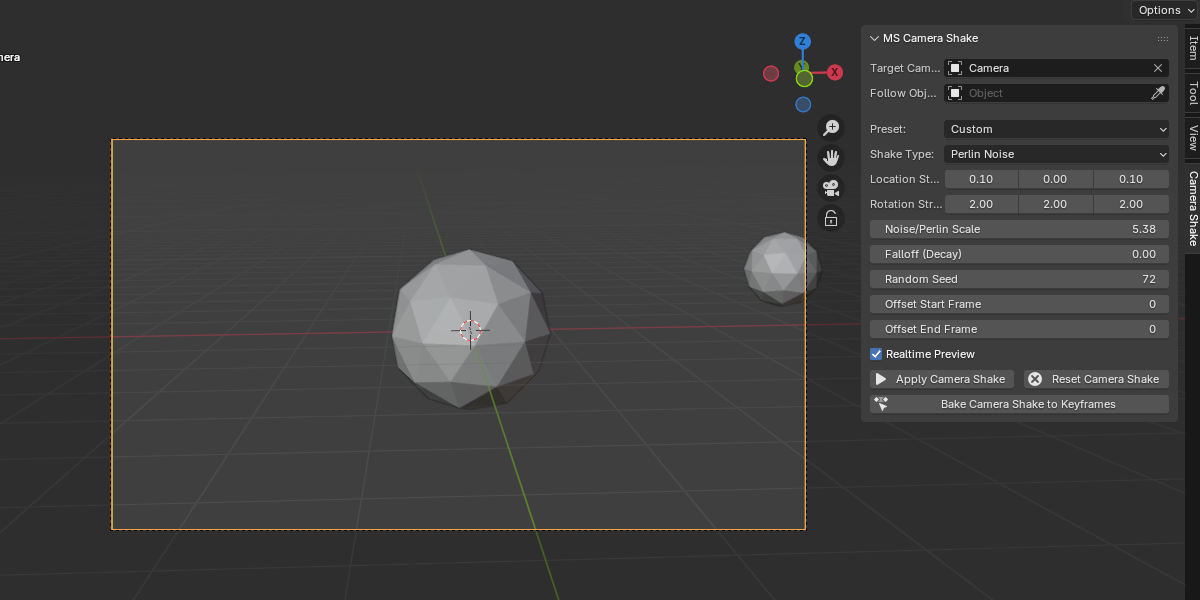
The Quake Motion Camera panel applies continuous movement between the scene's start and end frames. Its Location option moves the camera randomly up, down, left, or right; Rotation adds random turns. The Vibration control adds noise to the motion, which the developer describes for shots such as racing or explosions. Stable, Mild, Extreme, and Chaos presets provide different shake levels, while the advanced motion panel exposes further controls such as strength, scale, and blend.
The separate Quake Camera Shake panel adds a shake at a selected frame, with a documented default duration of 20 frames. Click Add Camera Shake Button and play the animation, or tap Shake Camera at the frame where the shake should begin.
Presets for different shots
Camera presets are available from Blender's Object > Add > Camera menu and the Quake panels. Pan moves from side to side for flight-style shots. Racing adds side-to-side movement and tilt for fast-moving subjects. Tilt shifts the camera's angle, HandHeld adds smartphone-like vibration, and Head gives a lightly shaking first-person view. The listing also describes other presets.
The product page describes version 1.5 of the Ultimate version as including a random motion generator with more than 500 styles, a random shake generator, and options for creating custom motion and shakes. The panels are available from the Quake tab in the 3D View or from Camera properties.
Camera tools and installation
Quake Camera Tools can convert camera movement to keyframes for use in other software or games. The panel also includes a track-object tool for parenting the camera to a selected object and a camera switcher for changing cameras during an animation.
The marketplace listing names Blender 2.79 through 4.0 in its version field, while its description says the add-on supports Blender 2.79 through the latest release without naming one. Check compatibility for your Blender version before installing. To install the add-on, extract the downloaded package and locate the inner add-on ZIP in the folder for your Blender version. The documentation gives folders such as addon/2.8/ and addon/2.9/ as examples. Install the matching ZIP through Blender's add-on installer. The documentation says the Pan preset works only in Blender 2.80 to 2.83 and that an update for 2.90 was not yet available; check that preset against the package you install.
The creator's listing identifies the license as GPL. It describes version 1.5 as an Ultimate version release. For current edition, price, compatibility, and package details, check the creator's product listing and its documentation.