RandoMixer is a 3ds Max plugin for creating collections of scene variants from objects in a 3ds Max scene. Organize objects into sets, choose operations such as swapping, scattering or randomizing them, and generate states to review in the viewport. You can render a collection as a sequence of images or export it to the 3ds Max timeline as an animation. Read the RandoMixer manual.
Build variants from object sets
A set groups objects with a shared purpose, such as alternative sofas, lights or character parts. RandoMixer can use one set or combine several sets, then create states according to the selected combination method. For example, you can show one element at a time to compare models, alternate between light setups, or choose one element from each set to assemble different combinations.
Set occurrence and element weights control how often items appear. You can also set the maximum number of variants. If the available objects and settings cannot produce that many unique states, RandoMixer creates the maximum number it can make without repeating a state.
Rearrange and vary scene objects
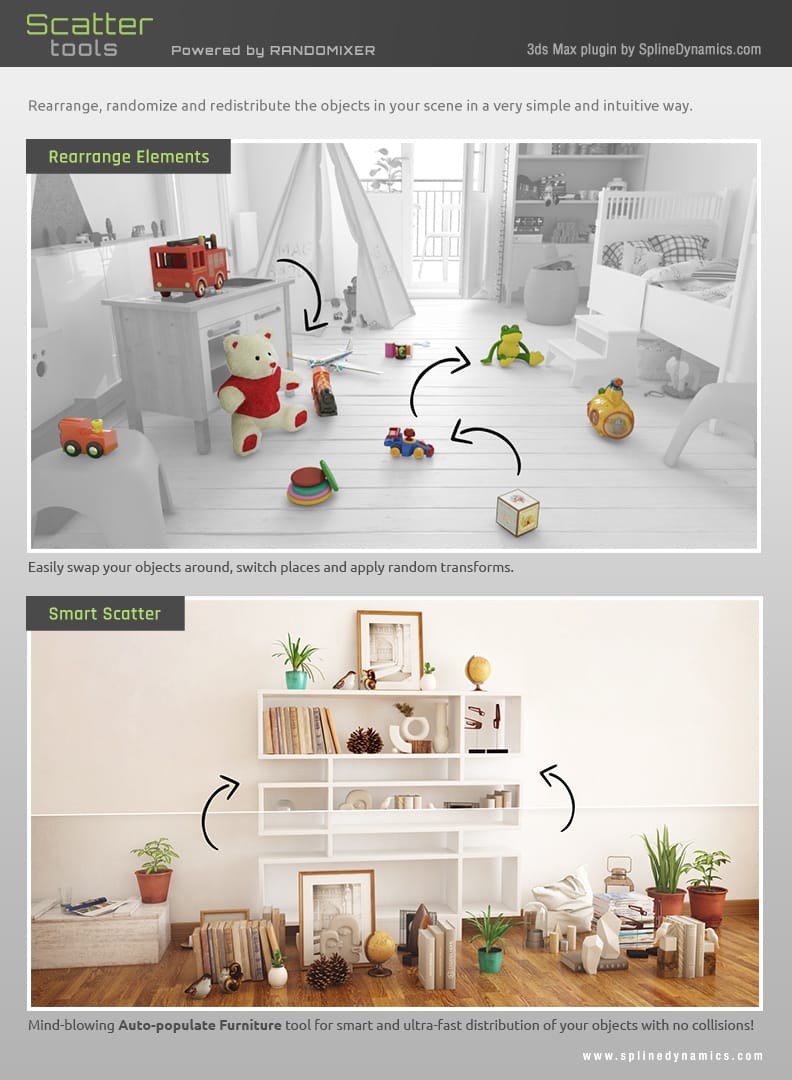
Switch Places rearranges objects, with options to inherit the target rotation, filter by similar dimensions and choose the reference point: pivot, center or base. Scatter can distribute objects across a surface, selected face directions, vertices or spline knots, or object pivots. Its furniture option places small objects on horizontal surfaces such as tables, desks and shelves.
Scattering includes collision detection. When an object cannot be placed without a collision, it stays in its original position. Random Transforms applies chosen minimum and maximum values for movement, rotation and scale. Other collection settings can vary materials, switch lights or change the active camera between states.
Review, edit and render collections
Move through collection states in the viewport, edit individual states, or manage several collections with the Collections Manager. From there, collections can be synchronized, rendered together or exported to the timeline. Rendering can produce a still image for each state or a frame range for animated states.
Keep the scene data with your project
The RandoMixer manual says to save the Master Icon with the 3ds Max scene if you want the collection to remain editable by the plugin. It lists 3ds Max 2015 or newer and says the plugin was tested through 2023. Later versions are described as expected to work, but the manual does not list them as tested. Check with Spline Dynamics if compatibility with a newer release is important for your project.