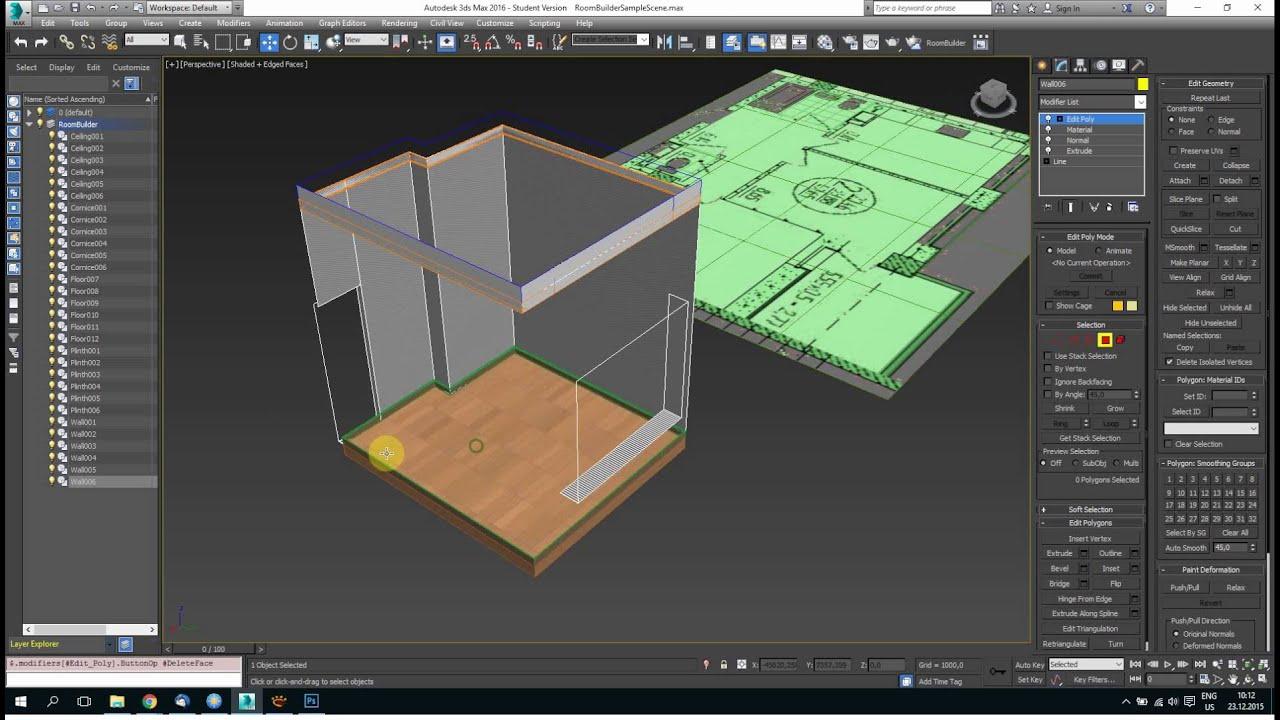
RoomBuilder 1.00 is a MAXScript utility for creating simple room shells in 3ds Max. It builds walls, floors, ceilings, plinths and cornices from dimensions or a room outline. The ScriptSpot listing describes rectangular rooms and custom splines, with one-sided walls. The developer's page includes setup and usage instructions.
Set dimensions or pick a spline
For a rectangular room, enter its length, width, height and floor level along Z. Choose whether to include the floor, ceiling and other details, then select Create Room.
For a non-rectangular outline, enable Use custom shape and pick the spline or splines in the scene. RoomBuilder adds selected splines to its Custom shape list and marks them red in the viewport. Use Delete to remove a spline picked by mistake. The developer recommends one spline object per room.
The developer also describes building rooms from AutoCAD contours. The available instructions show a spline-based custom-shape workflow but do not detail a direct DWG import step, so check how your CAD outline needs to be prepared before relying on that handoff.
Check the wall model before using it
RoomBuilder is designed for single-layer, one-sided walls without thickness. The same wall outline drives the floor, ceiling, plinth and cornice. This suits simple room shells built from a shared contour.
Install and launch RoomBuilder
- Download the RoomBuilder script from the developer's page.
- In 3ds Max, open the Command Panel, choose Utilities, select MAXScript, then click Run Script and choose the file.
- Open the Utilities dropdown and select RoomBuilder to show its interface.
To load the script at startup, the developer suggests copying it into the 3ds Max scripts\Startup folder. The page gives a 3ds Max 2016 path as an example; use the Startup folder for your own installation.
Version and compatibility
ScriptSpot lists RoomBuilder as version 1.00 and dates its listing to December 2015. The supplied product materials do not specify a supported 3ds Max version range. The developer's 3ds Max 2016 Startup-folder example is an installation path, not a compatibility statement. In a March 2025 comment, the developer said they no longer worked with 3ds Max and did not plan further development. Test RoomBuilder 1.00 in your target release before using it in production.