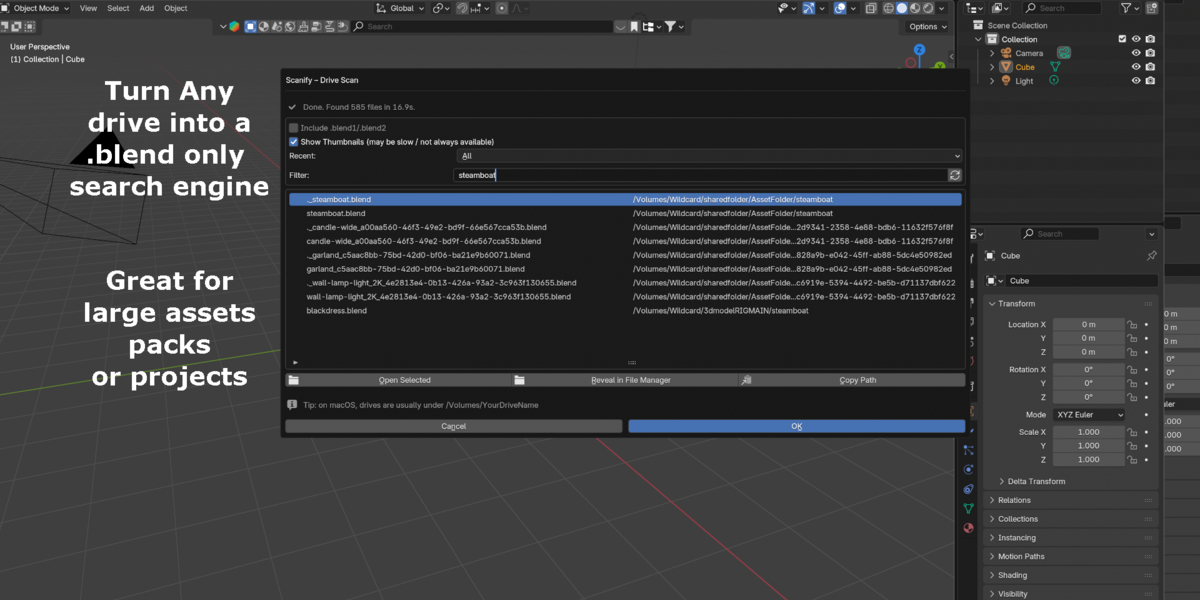
Scanify is a Blender add-on for searching a selected drive or folder for project files. Its live results can be searched by filename and filtered to the last 24 hours, 7 days, 30 days or all files. This can help when a project no longer appears in Blender's Recent Files list or is buried in an older folder.
Find and open Blender projects
Scanify searches for .blend files and can optionally include Blender's .blend1 and .blend2 backup files. From the results, you can open a project in Blender, reveal it in Finder or Explorer, or copy its full path. The documentation also describes optional thumbnails for browsing results.
Install it and start a scan
Download the ZIP file, then install it through Blender Preferences under Add-ons and enable the add-on. In Blender, open the File menu and choose Scan Drive for blend. Select a drive to scan, or choose a folder instead. The Scanify documentation describes the installation and scan steps.
Compatibility and license
The product listing identifies Scanify as a Blender add-on for Windows, macOS and Linux. It lists Blender versions 4.5 through 5.2 and a GPL license. Check the current product listing for compatibility details before installing.