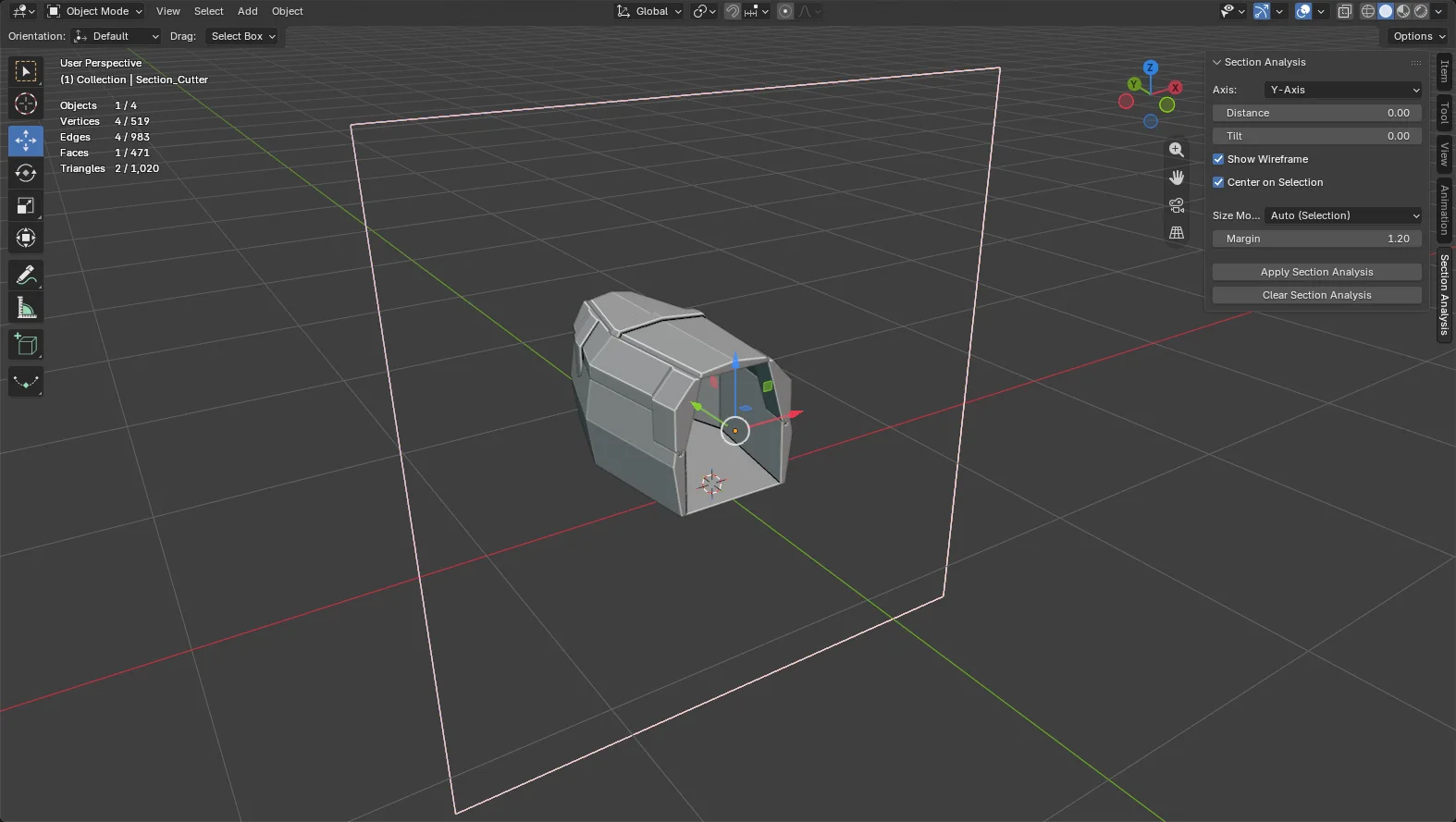
Section Analysis Tool is a Blender add-on for creating cross-sections and analyzing internal geometry. The Blender Extensions catalog tags it for 3D View, Mesh, and Modeling. It may suit modeling work where inspecting a mesh’s interior is part of the task.
Section controls and mesh behavior
The project README describes cuts along the X, Y, or Z axis, with adjustable distance and tilt. Center on Selection places the plane at the selected mesh objects’ combined bounding-box center; when it is off, the distance offset uses the world origin. Plane sizing can use a fixed size or fit the selected objects’ combined bounding box with an adjustable margin. A wireframe toggle switches the plane between wireframe and solid. Applying Section Analysis adds a Boolean Difference modifier to each selected mesh object without changing its mesh data. Clear Section Analysis removes the cutter and modifiers, restoring the original geometry. The current add-on implementation has no measurement readout or export action.
Version and compatibility
The Blender Extensions catalog lists version 1.0.0, a minimum Blender version of 4.2.0, and a GPL-3.0-or-later license. See the official extension listing for release details. For installation from a downloaded archive, follow Blender’s Install from Disk instructions.