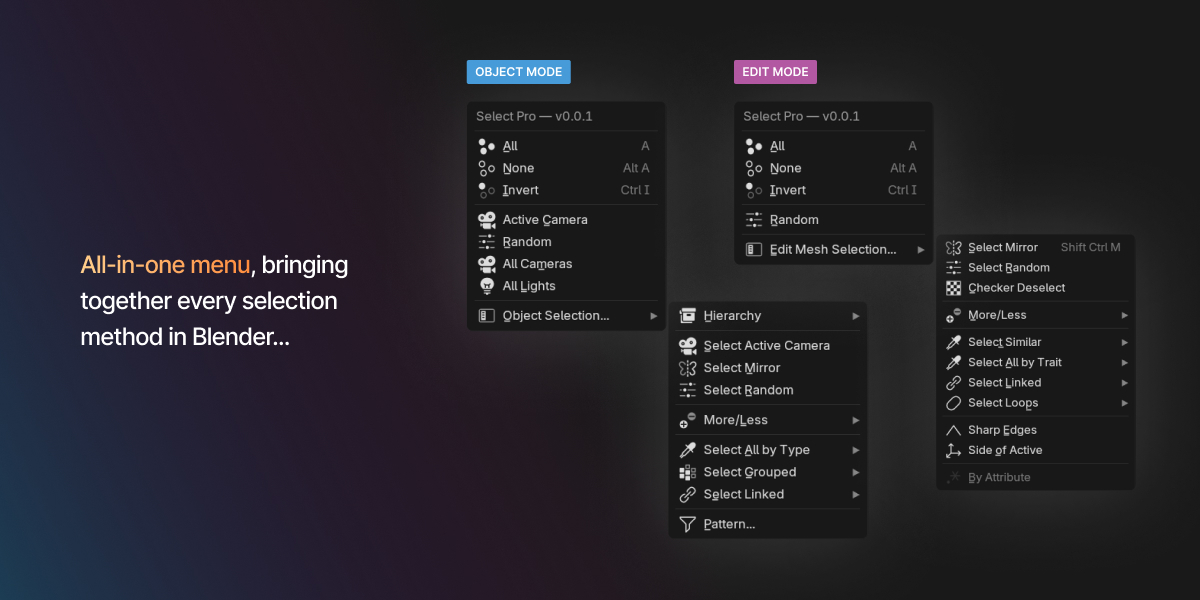
Select Pro is a Blender add-on by Huge Menace that brings Blender's selection methods together in one context-aware menu. It considers the scene, mode and topology, then highlights relevant tools. The add-on also includes selection tools for mesh elements in Edit Mode and object relationships in Object Mode.
Context-aware selection in Blender
Selection needs change with the task. Select Pro adjusts the tools it highlights to the current scene, mode and topology, bringing the relevant options into one menu. This suits workflows that move between selecting mesh parts and organizing objects.
Edit Mode tools for mesh selection
In Edit Mode, Select Pro includes tools for selecting:
- Contiguous edge paths using an angle threshold, prediction or both.
- Faces that form a continuous surface, using face similarity or boundary edges.
- Similar islands by bounding volume or structural complexity.
- Connected edges that share a sharp, seam or bevel-weight mark.
- Connected boundary edges based on linked-face convexity, concavity or edge nakedness.
- Connected or unconnected vertices by distance from one vertex.
- Connected faces by their normals, with an adjustable threshold.
Object selection tools
In Object Mode, the add-on can select objects by hierarchy, including roots, ancestors or a full family tree. It also finds similarly sized objects using dimensions or bounding volume, and similarly named objects by stripping common affixes or using fuzzy string matching.
Compatibility and documentation
The Superhive listing identifies Select Pro as a Blender extension-compatible add-on distributed under the GPL. It lists Blender compatibility from 4.5 to 5.3. That range describes compatible Blender releases, not Select Pro's own version number. Check the Superhive product listing for current compatibility details and the developer documentation for usage instructions.