Select Similar Geometry is a Blender add-on for finding mesh objects whose vertex positions resemble the active object. It can help when a scene contains duplicates, instances, moved copies or edited versions of a mesh. The listing specifies Blender 5.0 or later.
How the geometry comparison works
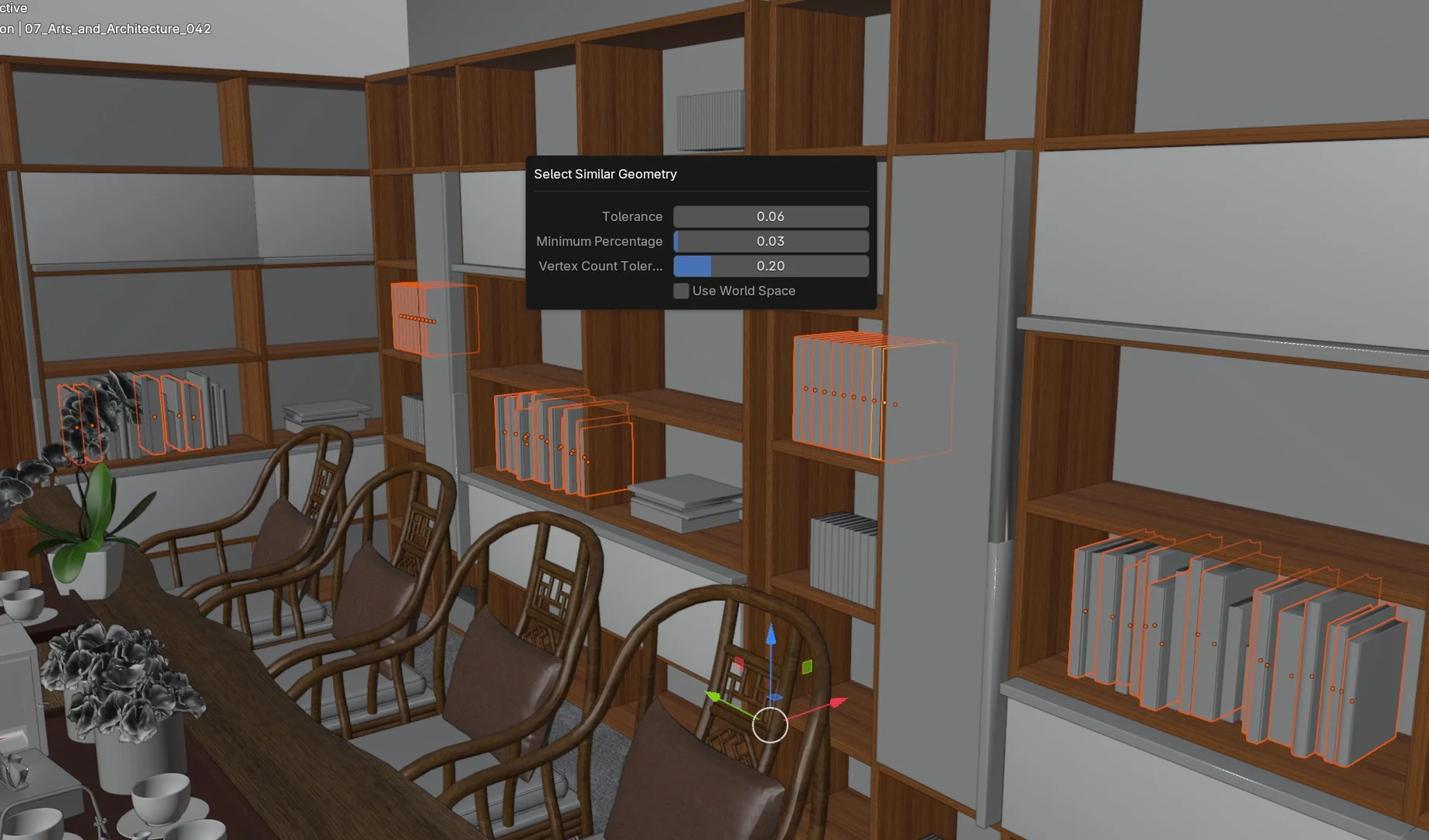
Choose a mesh as the active reference, then run the operator from the 3D Viewport Select menu. The add-on builds a KD-Tree from the reference vertices and checks candidate vertices against it within a set tolerance. It calculates the similarity percentage as the number of matched candidate vertices divided by the active object's total vertex count, then selects candidates that meet the minimum percentage. Vertex index order does not need to match because the comparison uses spatial positions. A vertex-count tolerance can filter candidates whose counts differ too much to compare.
Adjust tolerance and coordinate space
Tolerance sets how close vertex positions must be to count as a match. Minimum Percentage sets the required similarity, using a value from 0 to 1. A higher threshold asks for a closer match; lowering it can include more modified copies. Vertex Count Tolerance sets the allowed difference in vertex counts between objects.
Use World Space determines whether the comparison uses transformed vertex coordinates or local coordinates. With World Space off, objects can match even when they have different locations, rotations or scales. Turn it on when the comparison should reflect vertex positions in the scene, such as when checking final aligned assets. Since the check depends on point positions and tolerance, meshes with a similar outline but different vertex placement may not meet the same threshold.
Where it fits in a modeling workflow
For duplicates or instances, start with the active object as the reference and compare in local space. To find modified copies, lower the similarity threshold and inspect the resulting selection. If the comparison should account for objects’ current scene transforms, enable World Space. Review the selected objects before continuing with other edits, especially when a lower threshold broadens the match.
Version 1.3.0 reuses one KD-Tree for candidate comparisons and adds vertex-count filtering to skip unrelated objects. The developer describes these changes as performance improvements for large scenes; no benchmark figures are provided.
Version and source details
The Blender Extensions listing shows version 1.3.0, a Blender 5.0.0 minimum, and a GPL-3.0-or-later license. The add-on is available as a standard add-on or a Blender Extension. The developer README documents its matching method and controls. Check the listing for the current release and compatibility details before installing.