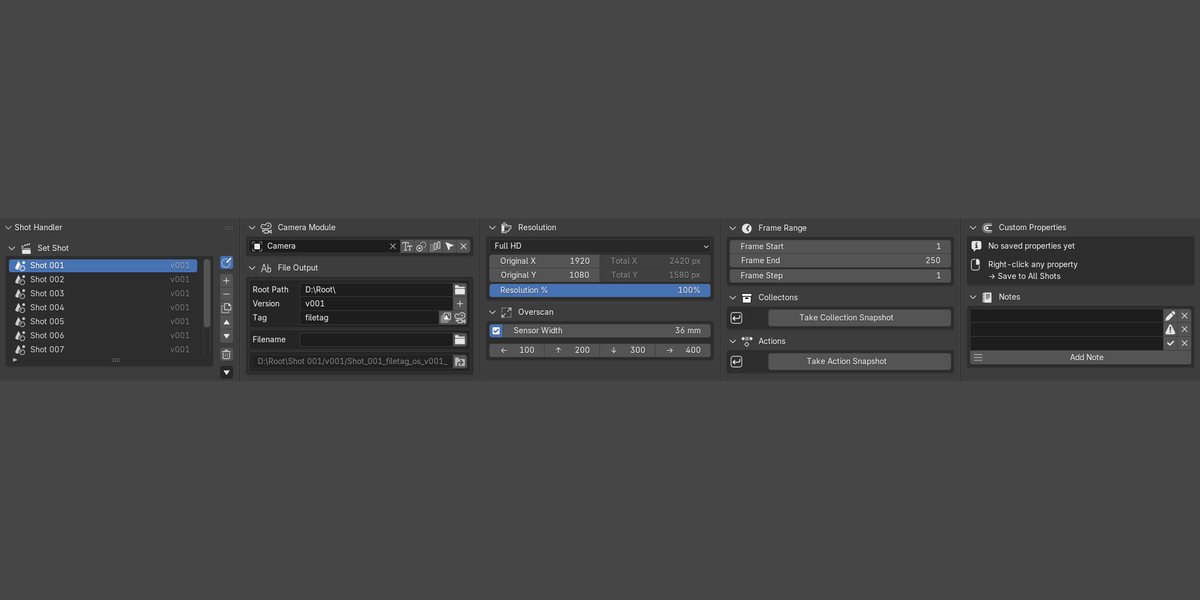
Shot Handler 4 is a Blender add-on by dubCUT for managing multiple shots and scene variants within one scene. The central list switches among shots and restores each shot's settings, including cameras, render output, frame ranges, collection visibility, action assignments, custom properties and overscan. The Superhive listing names Blender 4.2–5.1 as its compatibility range and Cycles and Eevee as supported render engines. Check the product listing for current details.
Keep camera and output settings with each shot
Assign a camera to each shot and keep its motion blur, depth of field, background image and other camera settings together. The naming and output controls can store root paths, versions, tags, filename overrides and compositor file output settings. Resolution presets or custom values let shots use different crops and aspect ratios, while frame start, end and step settings preserve each shot's timing range.
These settings are useful when one Blender scene needs several delivery formats or camera setups. Switching shots restores their saved configurations, which can reduce repeated setup and help avoid output differences caused by manual changes.
Manage collection and animation states
Collection Snapshot saves collection visibility and view layer states for the viewport and render, including selection, holdout and indirect-only controls. Action Snapshot stores action assignments and action-slot states for animated objects. This gives a scene a way to keep different visual or animation variants organized as separate shot states.
Shot Handler can also save and restore custom properties across objects, bones, materials, nodes and scene data. Examples in the product listing include rig switches, shader controls and Geometry Nodes values. For supported properties, a Blender context-menu command can save the value to all shots at once.
Work from a central shot list
Create, duplicate, reorder and switch shots from the list. Auto Save is available for fast changes, and the list can export simple .bat files for background rendering. Shot notes can hold statuses, reminders, warnings or work-in-progress details inside Blender.
Set overscan per shot
The overscan module accepts separate values for each side in pixels or percentages. Its workflow also covers camera and background-image handling, metadata export and compositing helper scripts. That makes it relevant for projects where overscan settings need to follow individual shots.
Shot Handler is suited to Blender artists managing multiple cameras, output variations, collection states or animation setups within one scene. The product documentation page links to a demo video.