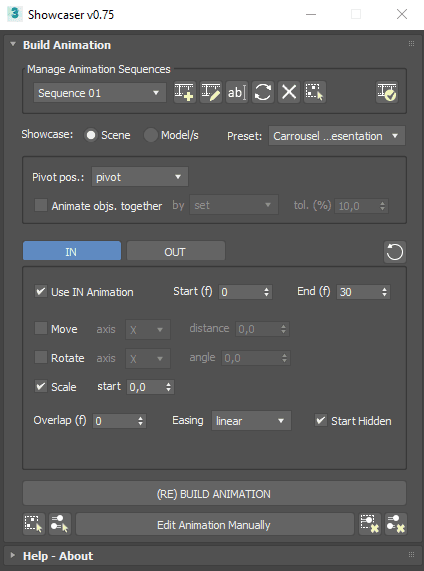
Showcaser is a 3ds Max script for building animated presentations from a scene or a set of models. Choose the objects, set their order and timing, adjust the animation parameters, then build the sequence. Showcaser creates keyframes on the objects’ position, rotation and scale tracks, which you can later edit with native 3ds Max tools.
The two animation modes suit different presentations. Scene mode assembles or clears a full scene object by object. Model/s mode presents objects one at a time, with optional entry, main and exit stages. Its main stage can hold an object still or rotate it in a turntable animation.
Set the object order and animation pace
Add objects by selection, name, layer or group. You can arrange them manually or sort them by name, size or position. For larger scenes, divide objects into sets and animate groups together by set, layer, similar size, instance status or a chosen number of elements.
Set the start and end frames for the full sequence in Model/s mode; in Scene mode, set them separately for the entry and exit animations. In Model/s mode, entry and exit lengths are percentages of each object’s display time. The overlap value controls how many frames successive object animations coincide; negative values create gaps. Combine movement, rotation, scale, or abrupt appearance and disappearance. Easing options include linear, ease in, ease out, ease in/out and spring, which adds a small bounce at the end. For a model presentation, the turntable can rotate the model around its Z axis. Showcaser can also generate a parametric turntable platform or use a model already in the scene.
Edit the result in 3ds Max
You can create several animation sequences in one scene, save and reuse presets, and choose an animation-only pivot position such as the object’s center, base center or top center. The manual explains that Showcaser animates helper objects parented to the scene objects, rather than changing their original pivots.
Build the automatic sequence before making detailed manual changes: rebuilding it replaces those edits. The manual also says Showcaser stores sequence helpers in a layer named “Showcaser.” Keep that layer if you need to preserve the sequence data. The developer describes Showcaser as a script with no plugin dependency, and says its generated keyframes can be edited with 3ds Max’s native tools.
Compatibility and export
The developer lists 3ds Max 2015 or higher as the requirement. The Showcaser manual says the script was tested with 3ds Max 2015 through 2024 and should work on later versions; it advises contacting the developer if a newer version causes problems.
The developer lists export to real-time and game engines that support 3ds Max animations, including Unreal Engine, Unity and Chaos Vantage. See the Showcaser export tutorial for an example workflow, and consult the developer’s Showcaser page for current product and trial details.