Sitob Camera Tools is a Blender add-on for artists familiar with Softimage (XSI) who want similar camera operations in Blender. Its tools adjust the 3D viewport, frame selections, save and recall camera settings, and reset a camera view. The package also includes a keyboard and mouse script for Softimage-style navigation.
Adjust the viewport around a selection
Camera Zoom View centers zoom and rotation on the selected object or element. Move the mouse left or right to change focal length, use the wheel to zoom, and hold right-click while moving the mouse to rotate the view. Press R to reset the view or Esc to exit the tool.
Frame Selected Plus fits the view to the selected object or element. It also improves framing when a single vertex is selected, which is useful when working close to mesh details.
Save and reset camera settings
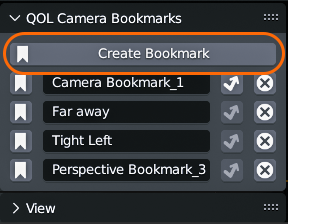
MemoCam saves and recalls up to four camera settings. It stores camera matrices in a JSON file in Blender's configuration folder. Click the checkbox icon to save a setting and the camera icon to apply one. Settings are overwritten each time the checkbox is ticked.
The camera tools are available only in Blender's 3D viewport. Reset Camera moves the user camera or active camera to a predetermined position. Preferences let you set the position, rotation and focal length used for that reset.
Use Softimage-style keyboard and mouse controls
The included SItoB_AutoHotKey.ahk script mimics Softimage camera operations while Blender is active. It uses the S or F5 key with mouse buttons for rotating, panning and zooming the 3D view without the Alt key. The listing also names M+XButton1 and Shift+middle-click as additional shortcuts. The script is an AutoHotkey file; see the AutoHotkey website for information about that tool.
Compatibility and license
The product listing marks Sitob Camera Tools as Blender Extension compatible and identifies it as an add-on under the GPL license. It names Blender 4.0, 4.1 and 4.2. For a later Blender release, check the product listing for current compatibility details.