Slice & Separate is a Blender add-on that cuts selected meshes by a chosen axis and either a defined distance or a number of slices. It separates each slice into its own object, giving you smaller mesh pieces to work with.
The developer describes it as especially useful for light baking with Unreal Engine GPU Lightmass. You can split one large mesh into smaller objects and work with smaller lightmap texture resolutions. See the product listing for the feature details.
Set the slicing method
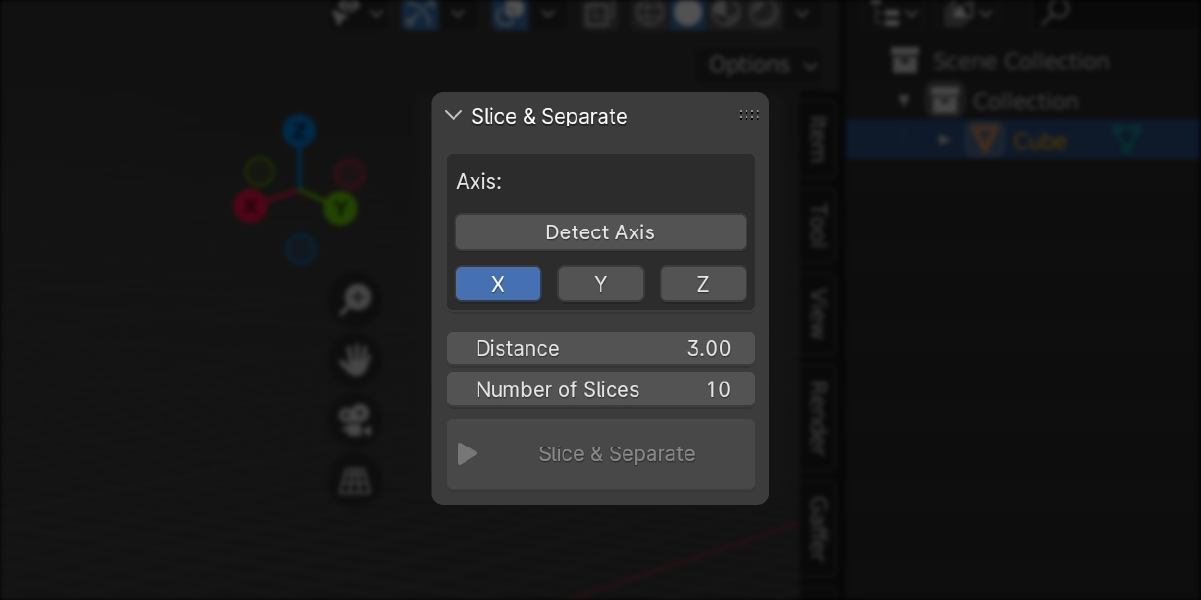
Choose a slicing distance when you want to define the spacing between cuts, or set a slice count when you want to specify how many pieces to create. You can choose the axis yourself or let the add-on detect one parallel to the object's longest side.
- Select the mesh object or objects to process.
- Choose an axis, or use axis detection.
- Set a slicing distance or number of slices.
- Run Slice & Separate to create individual objects for the slices.
The add-on's documentation describes this workflow. After installation, its controls appear in a Blender side panel named Slice & Separate.
Changes in version 1.1.0
Version 1.1.0 added slicing for multiple objects in one go and improved performance on objects with high triangle counts. It also added a progress bar, a warning and confirmation dialog for bigger calculations, and Grid Mode in the add-on preferences.
Version and license
The Superhive listing identifies version 1.1.0, Blender compatibility from 3.6 through 4.5, and a GPL license. Check the listing for current release details.