Sound React Addon by EdenWeby 3D connects audio to animatable Blender properties through their data paths. A property can respond to a frequency you choose or to one of the add-on’s presets. For example, you can set a cube’s scale to react to bass and a sphere’s scale to react to higher sounds. The product listing describes the controls and setup steps on its Sound React Addon page.
The add-on can drive scale, location, rotation, or another animatable property when its data path is accessible.
Frequency presets and controls
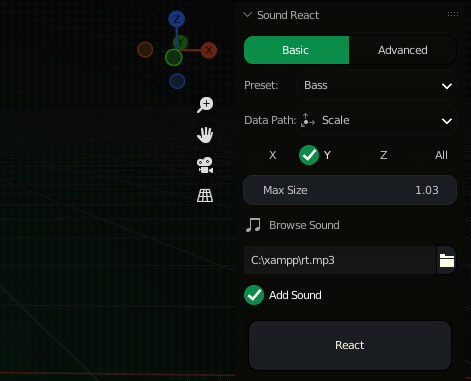
The Basic tab is for setting up a reaction with presets. The Advanced tab lets you target one specific frequency. The available preset names are Bass, Kicks, Mild, High, Treble, and Full. The listing does not give numerical frequency boundaries for these presets.
For the property, choose Scale or use Custom and paste in a data path copied from a Blender property. The Max Size control scales the object up or down. An Add Sound option adds sound in the background.
Set up a sound reaction
- Add a keyframe to the property you want to animate. The listing says to make that keyframe the first or selected item in the F-Curve Modifier.
- Open the Sound React panel. To target a custom property, right-click it in Blender, choose Copy Data Path, and paste the path into the Custom data path field.
- Choose a preset in the Basic tab, or use the Advanced tab to target one frequency.
Version 1.2 describes another route using an active keyframe: set Data Path to Active Keyframe in the panel, then click React. This applies the sound reaction to the keyframe you added to the object.
Compatibility and license
The product listing identifies version 1.2, a GPL license, and Blender compatibility from 2.8 through 3.5, including 2.93. Those listed releases do not confirm compatibility with later Blender versions. Check the current listing for compatibility details before installing.