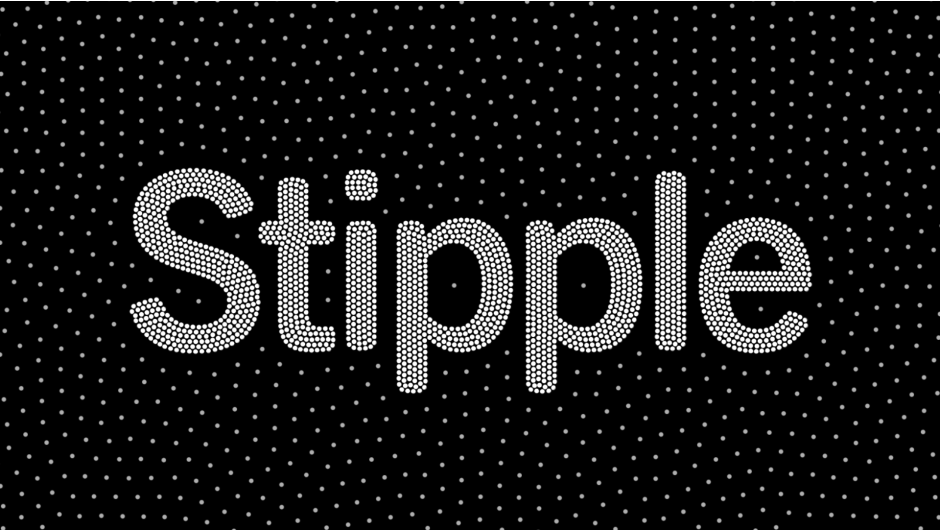
Stipple is a Rowbyte plugin for Adobe After Effects that turns footage into animated image stippling, with shading formed from small dots. A physics simulation guides the dots using the image map, keeping their movement visually coherent from frame to frame.
How Stipple builds its look
In image stippling, dots create shading: denser placements add detail, while wider spacing leaves lighter areas. Rowbyte contrasts this with dithering, which uses randomized pixel patterns. Its product page describes Stipple’s output as blue noise and the dithering pattern as white noise. The simulation makes dots interact with one another and the image map as footage drives their movement.
Controls for animated patterns
Stipple gives motion designers several ways to shape the result:
- Drive dot movement from footage.
- Use custom sprites and randomize them.
- Map dot color and size to velocity.
- Stretch dots to create trails.
- Use external layers for color maps, added in version 1.0.3.
These controls let you change the texture and motion of the stippling while keeping the pattern tied to the source footage.
Rendering and compatibility
The simulation and rendering use the GPU, and Rowbyte says a wide variety of GPUs are supported. Stipple was built for After Effects’ multi-threaded architecture and Multi-Frame Rendering (MFR), with caching in its rendering workflow. The version history lists version 1.0.4, dated April 28, 2026, with GPU pipeline performance improvements and minor bug fixes. Version 1.0.5, dated April 30, 2026, fixed cache issues.
Rowbyte lists compatibility with After Effects CC 2021, CC 2022, CC 2023, CC 2024 and above, on Windows 10 or later and macOS 10.13 or later. The macOS version supports Apple Silicon natively.
Documentation and examples
The Stipple documentation covers its controls. Rowbyte also provides sample projects. The product page links to tutorials on setup, sprites and stretch, simulation steps, forces, color and size modes, and wiggle control.