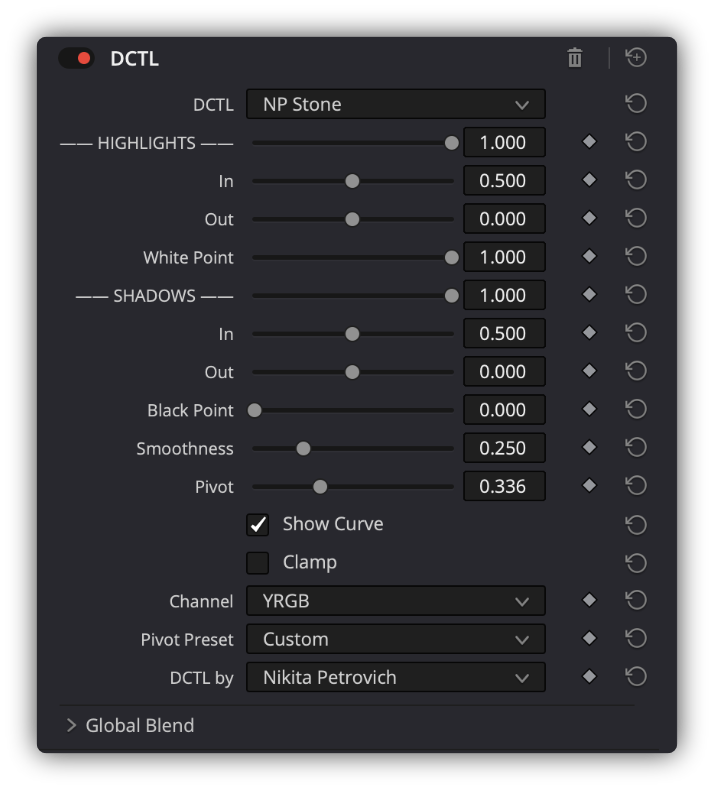
Stone DCTL is a pivot-based curves DCTL for DaVinci Resolve, made by Nikita Petrovich. Set a middle-gray pivot, then use sliders to shape highlights and shadows. Highlight and shadow adjustments use 0.001 precision. Moving the pivot shifts the other controls to preserve the curve’s shape, which can help when matching a grade across similar color spaces.
Channels and curve controls
Choose Y (luma), R, G or B to adjust one channel, or YRGB to adjust them all. Four highlight and four shadow parameters map to color-panel knobs, while a smoothing control adjusts the curve’s overall shape. Pivot presets include ACEScc/cct, ARRI LogC4 and RED Log3G10. Version 1.0.0, dated August 17, 2026, added a checkbox to clamp output values between black and white points and an option to show curve anchor points.
The earlier 0.1.2 release added an RGB Curve Visibility slider to change the overlay brightness. The overlay-brightness control can help when custom CST nodes, such as OpenDRT, make the curve appear white.
Working across color spaces
You can copy a curve between similar color-space families, such as Log to Log, then adjust the pivot in the destination space. Results may vary with the project’s color science and output display transform (ODT). For a subtractive saturation curve, set the node-level color space to HSV or HSL and select G in Stone DCTL. Keep the input between 0 and 1; values outside that range can lose information.
If smoothing changes a region that should stay fixed, move an anchor point in the unaffected section to the pivot. For separate channel work, use sequential nodes and select the channel to adjust. Parameter tooltips are available when hovering over controls, except on the Fusion page.
Requirements and licensing
The aescripts product listing specifies DaVinci Resolve Studio 19.1 or newer and an NVIDIA or Apple Silicon GPU. Its compatibility summary lists Resolve 19, 20 and 21; the version history clarifies that version 1.0.0 and later require 19.1 or newer.
The listing shows $19.99 as the suggested price under its Name Your Own Price terms. Individual users may pay any amount; businesses and teams must pay the suggested price for a valid license. Check the listing for current terms and build details. For installation guidance, see the DaVinci Resolve DCTL FAQ.