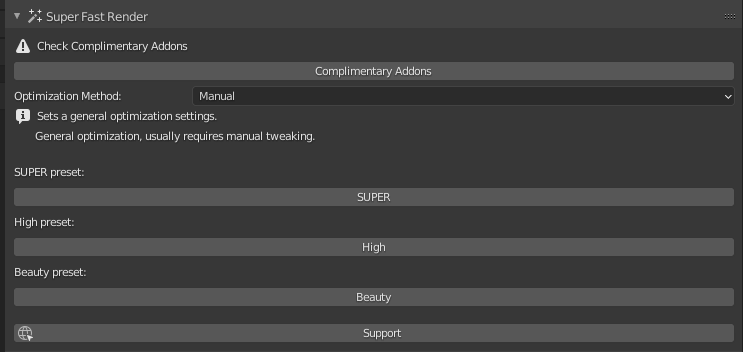
Super Fast Render is a Blender add-on from Pidgeon Tools that benchmarks a scene and calculates settings intended to balance render quality and speed. It also includes manual presets and one-click general scene optimization. The developer says the add-on will not be updated and points users to Pidgeon Toolbag as its successor. See the Superhive listing for product details.
Automatic and manual optimization
Automatic mode benchmarks the scene to find settings for that scene. Manual mode lets you choose a preset instead of waiting for a benchmark. The add-on's documentation also describes a one-click general optimization option for a quick setup. These options give artists a choice between scene-specific testing and a faster preset-based starting point.
Benchmark settings and behavior
The Super Fast Render documentation says Benchmark Res lowers the image resolution during benchmarking to speed up the test. Threshold controls when the benchmark stops increasing quality; a higher threshold makes the result less precise. Choose an empty folder for Benchmarking Files before starting. The documentation says Blender freezes during a benchmark and recommends background rendering, with the render result available in the selected folder while the test runs.
Compatibility and maintenance
The product listing identifies version 3.0.1, GPL licensing, and Blender versions 2.92, 2.93, and 3.0. It does not list compatibility with later Blender releases. Since Pidgeon Tools says Super Fast Render will not be updated, users on newer versions should check the developer's successor listing for current details.