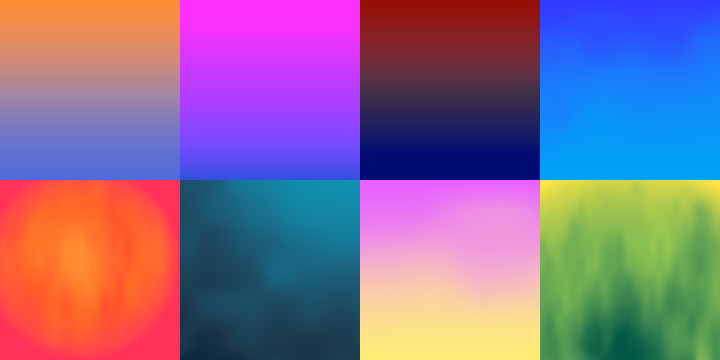
synthetick GradientHub is an After Effects panel for browsing, editing and applying gradients. Its library includes 650+ presets with visual thumbnails. Choose from six targets: Colorama, Shape Layers, Layer Styles, proGradient, Thicc Pro and Color Shift. A saved or imported gradient can be applied to any supported target.
Find and apply a preset
Browse gradients by thumbnail, switch between wheel and linear previews, or narrow the library with color filters and favorites. Double-click a preset to apply it, or select it and use the Apply button. The same panel brings these controls together for After Effects effects, shape layers and layer styles.
Keep control of existing effects
For Colorama, proGradient and Color Shift, choose whether to update an existing effect or add another instance. Thicc Pro has no Apply to existing or Add new option; GradientHub always updates the existing Thicc Pro effect. Apply to existing changes the gradient while preserving the effect's other settings. Add new unless selected creates a separate instance unless you select an effect to update. Use Apply to existing to audition presets without rebuilding an effect or adding another instance.
Layer Style mode applies gradients to Gradient Overlay, Outer Glow or Inner Glow. When a matching style already exists, GradientHub replaces its gradient colors and leaves its other parameters intact. Shape Layer mode can update existing Gradient Fills and Strokes or add a new gradient group directly to Shape Layer Contents; the new group may need to be moved into a shape group to appear. The current documentation notes that applying to multiple selected shape layers is supported from version 1.6.2.
Import or build your own gradients
Import gradients from Photoshop GRD files, CSS files or SVG files. GradientHub reads CSS linear-gradient() definitions and linear or radial gradients in SVG files. CSS color stops that use variables and SVG freeform gradients are skipped. Imported gradients appear as presets with generated thumbnails, so they can be browsed alongside the built-in library.
The Studio section lets you mix, edit and create gradients. Adjust color and alpha stops, make a gradient cyclic for continuous color cycling, then save it for later use. You can organize saved presets into categories and subcategories; GradientHub generates thumbnails for them automatically.
Check compatibility and licensing
The catalog listing reports compatibility with After Effects 2026, 2025 and 2024. The current aescripts product page lists a paid license and a limited free trial: the built-in Colorama presets and the first seven presets in each other category. Check the GradientHub product page for current system requirements, trial terms and pricing before installing.