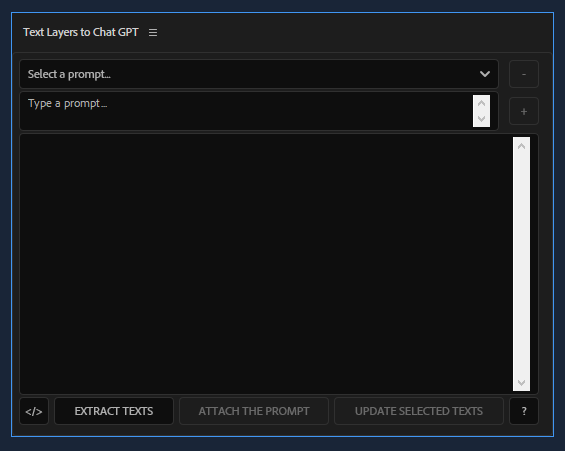
Text Layers to ChatGPT is an After Effects script by Airweb for generating or revising text with custom prompts. It moves text between selected layers and a ChatGPT conversation through copy and paste, then lets you update the selected layers with the returned text.
How the text workflow works
- Select text layers and use Extract Texts to bring their contents into the text window.
- Choose or attach a prompt. You can add prompts to the dropdown, remove a selected prompt, and save prompts in your preferences.
- The workflow requires an OpenAI account; a free account works. Copy the text from the window and paste it into ChatGPT. After it processes the request, copy the response and paste it back into the After Effects text window.
- Use Update Selected Texts to apply the returned content to the selected layers.
You can review the response in the text window before updating the selected layers. Results are not guaranteed; they depend on the prompt and ChatGPT's interpretation.
Uses and compatibility
Custom prompts can guide translation and spelling checks for existing copy, or generate structured composition text such as proverbs or dialogues. Compatibility is listed for After Effects 2025 and 2024; support for other releases is not confirmed in the supplied product details.
Limits to keep in mind
The limit is approximately 4,000 characters, but its scope is unspecified: it may cover the extracted text, prompt, response, or combined exchange. For longer copy, divide the work into smaller requests and check each result before applying it.
The control marked </> for executing ExtendScript. When the text window is empty, it opens a dialog to create a text layer with a specified number of keyframes. See the aescripts product listing for the product details and current trial information.