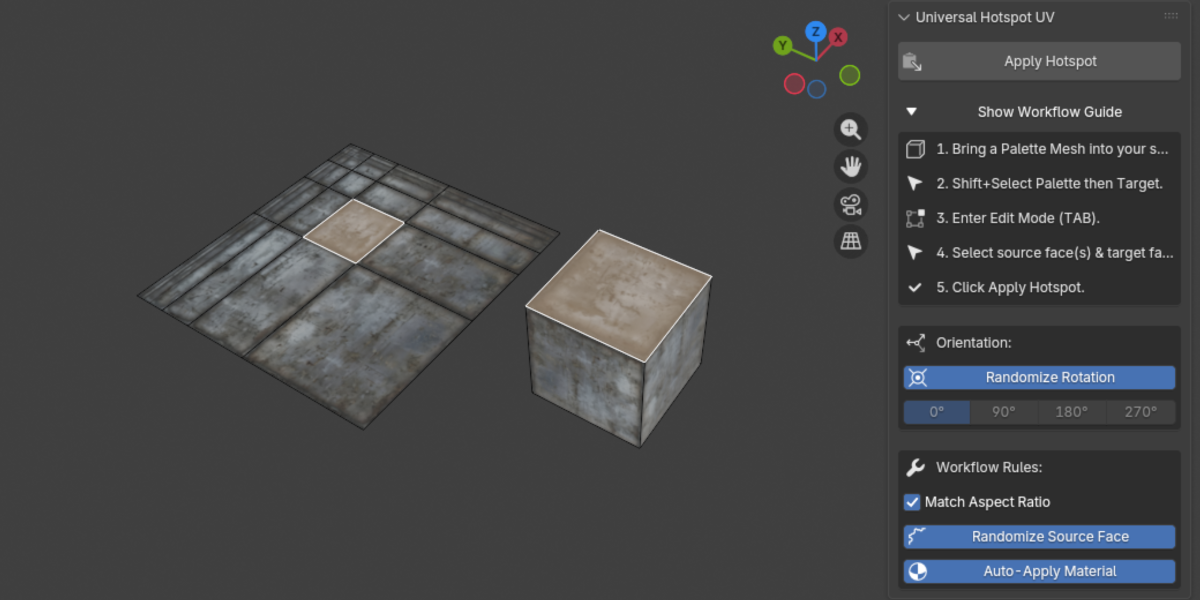
Universal Hotspot UV is a Blender add-on for stamping trim-sheet UVs from a 3D reference object. Add an Atlas Mesh to the scene, select a bolt, panel, or trim, then apply its UVs and material to faces on a target object. The workflow keeps trim selection in the 3D viewport instead of a 2D UV grid.
Choose trims from a 3D Atlas Mesh
The add-on calculates local 2D tangent spaces and aligns the longest edge of a target face with the longest edge of the selected trim. That orientation is intended to keep directional details, such as wood grain or metal streaks, running along the face. Its product description says the operation uses native Multi-Object Edit Mode math rather than screen-space raycasting.
Transfer materials and vary repeated details
When a UV is stamped, Universal Hotspot UV can read the source material, append it, and assign it to the target faces. For repeated details, its mass randomization feature scatters selected trims across multiple empty faces, carries their materials over, and applies random 90-degree rotations. The listing also describes manual rotation in 0°, 90°, 180°, and 270° steps, with the face aspect ratio preserved.
Check compatibility and bundle access
The Superhive listing names Blender 4.0, 4.1, 4.2, 4.3, 5.0, 5.1, and 5.2 in its compatibility copy, while its Details field gives a range of 4.1–5.2. Check the current seller documentation if you use Blender 4.0, since the listing fields disagree on that version.
The add-on works with custom trim sheets. The seller also says it is included with a purchase of the Universal Hotspot Library, which supplies pre-made 3D trim palettes. The Superhive listing shows the add-on at $9.99 on its own.